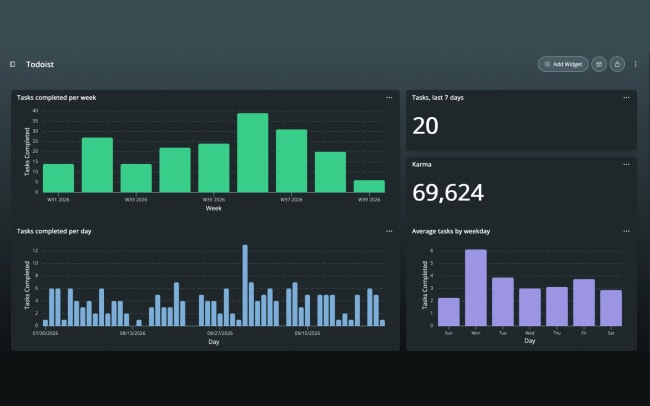
DayDash brings data from the apps you already use into one place, so you can see how your work, health and money fit together. Build your own dashboards, dig into questions with Explorations, and ask the AI assistant about your own numbers. It can build dashboards for you too. Your data is encrypted with keys only you hold, and it’s never sold.
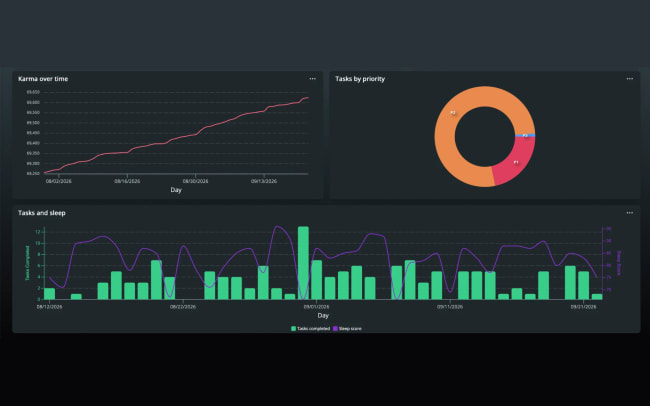
Connect Todoist and DayDash imports your completed tasks, with their project, priority, labels and due date, plus your daily Karma stats, and keeps them up to date. Chart what you finished by project or day of the week, follow your Karma over time, or ask the assistant which projects took up your month. DayDash only reads from Todoist and never changes your tasks.
機能
-
Explore how your sleep, workouts, and other health data affect your productivity.
-
See where your week went: chart completed tasks by project or priority.
-
Find your most productive days: see how many tasks you finish on each day of the week.
-
Build a weekly review dashboard with tasks done this week, your busiest projects, and your Karma.
-
Ask the AI assistant things like “Which project did I finish the most tasks for last month?” and get an answer from your own data.