
There is more to knowledge management than just notes – your notes should seamlessly integrate with your tasks. Yet, an all-in-one approach to notes and task management probably requires trade-offs in functionality. The Todoist + Capacities integration powerfully solves this. Capacities provides an intuitive note-taking experience, and Todoist gives you all you need to execute your tasks. Combine the two, and you have actionable tasks in Todoist with just one click in Capacities.
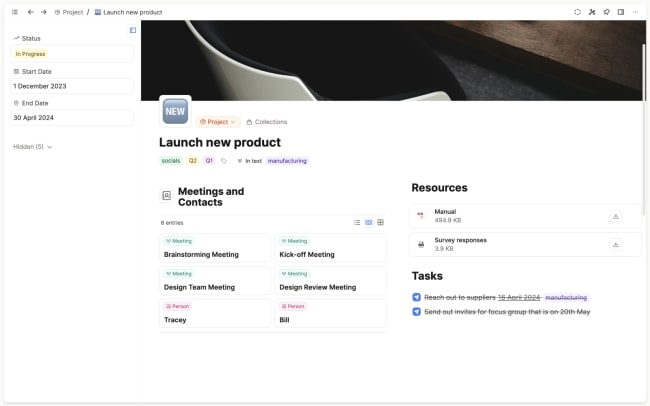
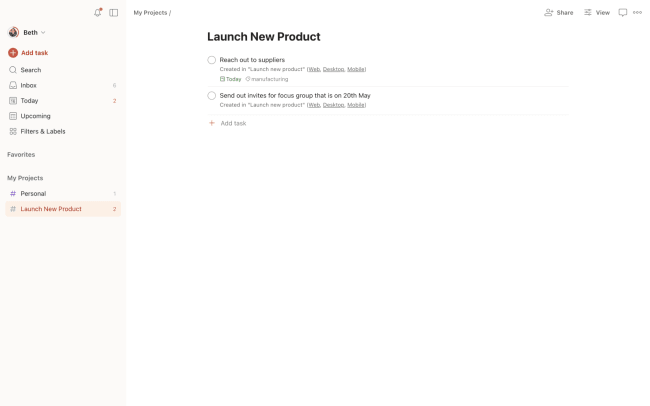
Simply add a checkbox to your notes, detail your task, add any labels and due dates, then hit send and get back to work. The task instantly appears in Todoist with a direct link to the original note for full context. From there, it's ready for action. It's a seamless integration that gives you an intuitive and sustainable approach for calm and effective productivity.
Funkce
-
Plan your projects and instantly send tasks to Todoist to get started right away – work tasks, groceries, home tasks, anything!
-
No need to forget tasks whilst context switching, just write it down in any Capacities note and press send.
-
Customize exactly how this integration works in the settings – you define what you need from this integration.

Nemůžete najít integraci, kterou hledáte?
Propojte si Todoist s tisícovkami dalších aplikací přes naše automatizační partnery. Nebo prozkoumejte naše API a připravte si vlastní rozšíření a integrace.