
Mailbutler is the leading email productivity extension for Apple Mail, Gmail, and Microsoft Outlook that enables you to have a more powerful inbox than ever before. The extension offers email-enhancing features such as email tracking, scheduling, and snoozing. Plus, you can create professional email signatures to represent your brand and use follow-up reminders to better manage your emails.
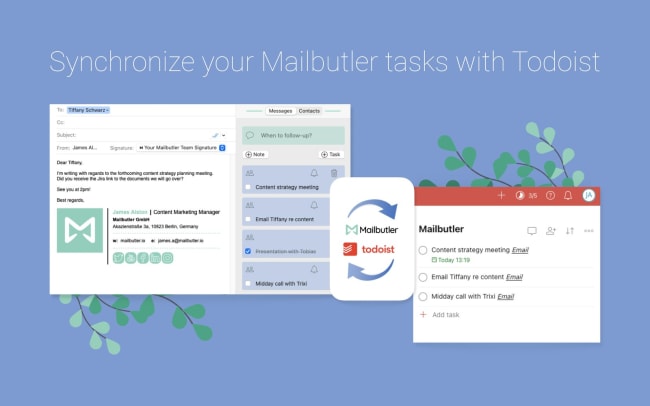
By linking your Mailbutler account to Todoist, you can turn your emails into Todoist tasks without leaving your email inbox. Your tasks will automatically sync to your chosen Todoist project with your email notes and reminders. Get right back to your email from Todoist by clicking the link in your task name. Never forget to follow up again!
Funkcje
-
Need to create a Todoist task, but don’t want to keep switching windows? With the Mailbutler integration, you can create tasks right from your inbox.
-
A task needs to be done by a certain date? Set due dates for tasks in the Mailbutler app.
-
If you and a team member need to work on a task together, you can share tasks and notes without leaving your inbox.
-
Want to update a task in Todoist and have it show up in Mailbutler? No problem! When your accounts are synced, all tasks updated in Todoist will show up in Mailbutler, and vice versa.
-
Can’t find a contact or email? Simply click on the “contact” or “email” link in the Todoist project and you’ll get redirected to where you added the task.

Nie możesz znaleźć integracji, której szukasz?
Połącz Todoist z tysiącami innych aplikacji za pośrednictwem naszych partnerów zajmujących się automatyzacją. Możesz też zapoznać się z naszym interfejsem API, aby zbudować własne rozszerzenia lub integracje.