
How to Stop Being the Organized One on Your Team
Tired of being the organized one on your team? Learn how Todoist reduces invisible work and keeps teams aligned with shared tasks and clear ownership.

I'm willing to bet that there's one person on your team (or at your organization) who's holding it all together. They're your go-to person for anything involving check-ins, follow-ups, and institutional memory.
Like remembering you need that client feedback tomorrow to deliver the project on time. Or why the team decided against that vendor back in Q1, even though nobody properly documented the decision.
Whether that person is you or a colleague, keeping track of everything probably isn't in the job description. Instead, the added responsibility of being the organized one likely evolved naturally, inadvertently creating a ton of extra tasks.
If you want to put an end to this invisible work and distribute the mental load more evenly, this article can help. I'll show you how this role tends to develop, the toll it takes, and a simple solution for team organization.
How teams end up with an unofficial project manager
Nobody plans for this unofficial project manager role. It evolves because someone has to stay on top of everything that falls between the cracks. When there's no time to focus or any kind of shared system for tracking cross-functional work, the most observant person on the team starts doing it themselves.
How the pattern develops
These days, work is becoming increasingly disconnected. According to Microsoft's 2025 Work Trend Index, employees are interrupted every two minutes by a meeting, email, or notification. That adds up to 275 disruptions per day.
Given this level of disruption, it's no surprise that 48% of employees and 52% of leaders say their work feels chaotic and fragmented. And when work seems disjointed, you need some kind of organization to keep things running.
If you don't have the right system in place, an organized person often steps in to fill the gap.
When the rest of the team learns that someone else is tracking things, they often stop paying attention. Why check the project status when you can just ask the person who always knows?
Over time, the organized person becomes the single point of failure for team coordination. Even if it's not really their job and they never exactly volunteered for it.
What the work looks like
At first, the extra work might be minor. Maybe you notice a due date is about to slip, so you send a quick message. Or you realize nobody assigned the follow-up from last week's meeting, so you do it yourself.
But gradually, the responsibilities start to pile up. It often involves:
Checking in on progress across workstreams without being asked
Remembering due dates and flagging them before they pass
Connecting dependencies that aren't documented anywhere, like the launch can't happen until legal signs off, but nobody told the launch team
Retaining historical context, like why the team abandoned an approach two quarters ago, even though it was never written down
Over time, you become the person everyone relies on to check in, follow up, and remember important details.
What it costs to be the organized one on a team
Being the organized one can be validating, as it makes you an integral part of the team. But when you regularly do invisible work that isn't technically part of your job, the costs add up.
Mental load
The organized person carries a running background process of open loops. Did the designer confirm the timeline? Has finance signed off on the budget? Is that partnership agreement up for renewal next month?
Tracking these tasks doesn't stop when you close your laptop. It tends to follow you into the evening or even into the weekend. For instance, you might find yourself lying in bed remembering that nobody responded to the brief you sent on Tuesday.
Attention residue
When you switch between tasks, part of your attention stays stuck on the previous one. Researcher Sophie Leroy calls this "attention residue" and links it to work performance. Essentially, the more attention you devote to things you aren't actively working on, the worse you perform on whatever you've switched to.
For the organized person, however, this is the default state. Say you're writing a report and you pause to check whether someone submitted the data you need. They haven't, so you send a follow-up, and now you're back to your report with half your brain still on the message you just sent. Then, multiply that by a dozen times a day.
Responsibility without authority
If you aren't a manager or on the operations team, your authority is limited. Yet you still feel a sense of responsibility to get things done.
So, you might see that something is about to go wrong, but you can't make someone else prioritize it. All you can do is send another reminder and hope they act on it this time.
Career cost
None of the invisible work you do affects your performance review. Sure, your manager might say you're organized or helpful. As nice as that might be to hear, it doesn't directly translate into a promotion.
That means you end up putting time into work that doesn't further your career and that takes away from the time you could be using to network, upskill, or perform better where it truly matters.
Why project management tools alone don't fix team disorganization
When your team feels disorganized, your instinct might be to add something like a new project management tool, a shared spreadsheet, or a dashboard. While that instinct makes sense, the solution doesn't necessarily help. Here's why.
Tools add to the toggling burden
Every new tool gives your team another surface to monitor. The average worker already toggles between apps roughly 1,200 times per day, according to research by Rohan Narayana Murty et al. This costs them just under four hours per week (and about 9% of annual work time) devoted to reorienting after each switch.
If the organized person is the only one opening the new tool, you haven't distributed the work. You've just given them another app to open, causing them to waste more time on context switching.
Apps don't create ownership
Even if a process isn't technically yours, you can develop a sense of psychological ownership. According to research by Jon L. Pierce et al, this can happen via three routes, including exercising control over it, building intimate knowledge of it, and investing themselves in it.
The problem is that a tool in a browser tab or on a desktop doesn't directly activate any of those routes. If team members never interact with the tracking system, they won't feel responsible for it. That means the organized person will still be the only one who pays attention.
How to make team organization a shared responsibility
If you've been the one holding everything together, it might feel risky to let go. But the goal here is to set your team up so that coordination becomes a shared habit (not your responsibility). It takes a few deliberate changes.
Make the work visible to everyone. No matter what tool you use, clarify that checking it is integral to collaboration. Make it easy for the whole team to see what's pending, what's blocked, and what's coming up.
Assign clear owners. Avoid leaving responsibilities unclear. Give every task an owner so everyone knows which ones are theirs. Balance responsibilities so you don't end up continuing to handle everything.
Have a system hold the memory. Due dates, reminders, and recurring responsibilities belong in a shared system, not in someone's head. Don't let your team's institutional knowledge walk out the door.
Expect things to slip. At first, some things might fall through the cracks. Remember that the temporary discomfort is better than the long-term cost of burning out the one person holding the team together.
How to use Todoist for sustainable team collaboration
With Todoist, you can take a workflow that currently exists in one person's head and move it into a shared setup.
Before: The organized person mentally tracks which steps are done and which aren't, hoping they don't forget anything. When they're out of office, someone has to text them for help while they're on holiday.
After: Everyone has access to a shared Todoist project with assignees, due dates visible to everyone, context stored in task comments, and recurring steps that don't require anyone to remember.
Here's how to use Todoist to stay organized as a team.
Create a shared project and assign owners
A shared project in Todoist gives the whole team visibility into every step of the process. Say you're setting up an onboarding project. You'd create a project called something like "New Hire Onboarding - [Name]" and add every step as a task:
Request laptop from IT
Set up email and tool access
Enroll in benefits
Schedule first-week 1:1s
Plan 30-day check-in
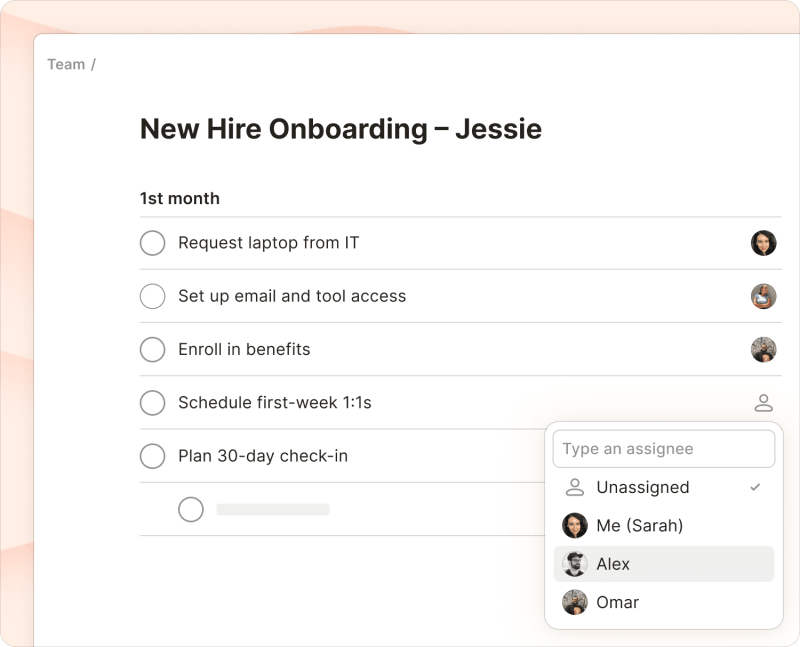
Get it all down, even the steps that seem obvious.
Assign owners to every task
Visibility is only half the equation. If every task is visible to your team but no one's technically responsible for them, the organized person is still the one who follows up.
In Todoist, you can assign each task to a specific person so ownership is explicit. That means IT setup goes to your IT contact, benefits enrollment goes to HR, and the welcome email goes to the hiring manager. Once everyone can see what's theirs, nobody needs to chase anyone.
Set due dates and reminders
A big part of the organized person's mental load is tracking who needs to do what by when, and following up when they don't.
With Todoist, you can set a due date on each task and add a reminder so the system sends the nudge instead of you. Set dates relative to the new hire's start date, and let the tool notify the appropriate person so you don't have to.
Add context via comments
When the organized person is the only one who knows the details, every question becomes a DM or a meeting.
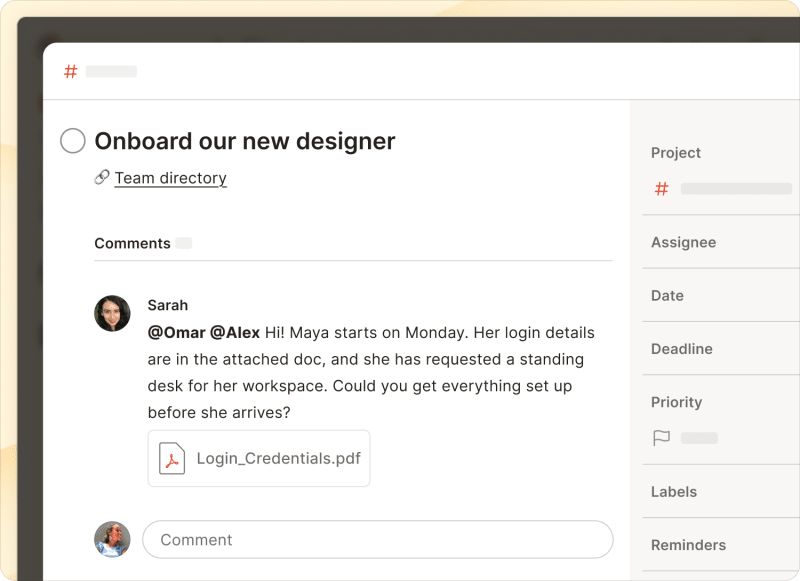
Todoist lets you attach context via task comments and file uploads. The login credentials doc, link to the team directory, and note about the new hire's standing desk request all go on the task itself. When someone opens their assignment, everything they need is already there.
Set up recurring dates for work that repeats
Every team has coordination tasks that follow a regular cycle. That might include a Monday standup agenda, monthly budget review, or quarterly objectives and key results (OKR) check-in.
With recurring dates in Todoist, you set them once and they pop up on schedule. The task automatically reappears, assigned to the right person on the right day.
See the full picture with project insights
Without a shared view of progress, the organized person becomes the person everyone asks for status updates.
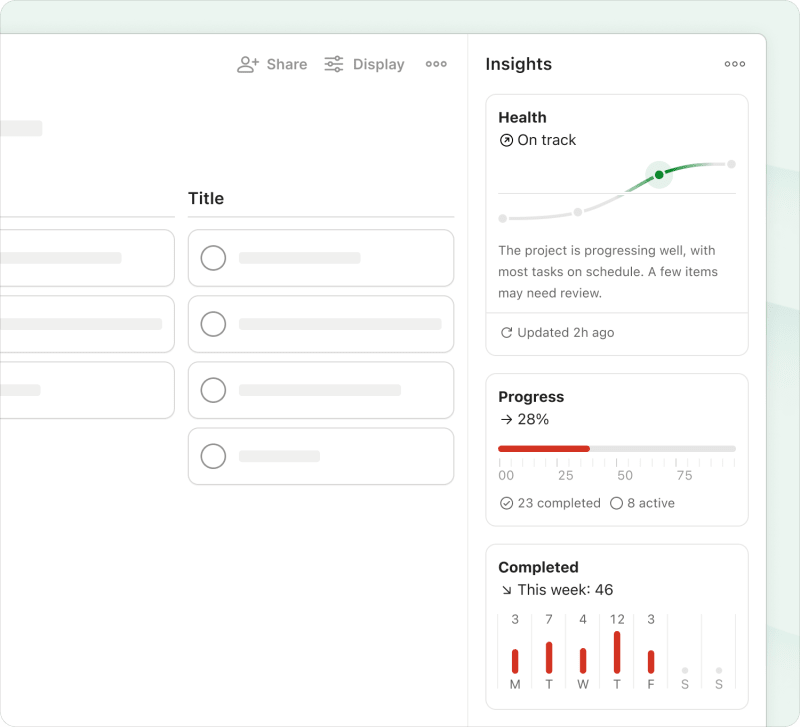
Project insights in Todoist give the whole team a view of what's on track, what's at risk, and what's overdue. Anyone can check it without sending a message or scheduling a meeting. It's the difference between a shared system and a dashboard with an audience of one.
The organizer role is common, and the work is valuable. But that doesn't mean it should fall on one person.
Shifting this work from one person to the whole team is easier than you might think. Instead of restructuring your entire setup, start with one workflow. Move it into a shared Todoist project, assign owners, and set due dates.
Then, see what happens when the whole team (not just one person) works together to keep things on track.

Anna Sonnenberg
Anna Sonnenberg is a writer, editor, and strategist with over a decade of experience creating content for B2B SaaS companies like Agorapulse, Komodo, and Relato. As a seasoned freelancer managing a dynamic client roster, she's always testing productivity and time management tactics.