A full list of all Todoist updates – from big improvements to obscure bug fixes – updated weekly. Made possible by your ideas and bug reports. Thank you! 🙏
Looking for just the big, exciting stuff? 👉 See all new features
September 10, 2026
Web, macOS, Windows, Linux
- ⭐ Amir added filters to the calendar’s Plan sidebar, so you can narrow tasks by project or label to find what’s worth scheduling.
- ⭐ Completed recurring task occurrences now show up in Today, Upcoming, and other date views – built by Natalie.
- 🐛 Ernesto fixed a CAPTCHA setup failure that could block web login and other account-security actions.
- 🐛 Ernesto also localized the action-filter headings in Reporting, which stayed in English regardless of your app language before.
- 🐛 Ernesto stopped task durations created through integrations from silently disappearing whenever you reschedule the task.
- 🐛 Ernesto fixed a snag where an expired session could block you from downloading your account backups.
- 🐛 Last on Ernesto’s list this week: the “Confirm your account” prompt no longer lingers once Todoist has already reconnected successfully.
- 🐛 Francesca hid the “No date” toggle from template calendar previews, since tapping it never actually did anything there.
- 🐛 Francesca also stopped Quick Add from popping open when you tap an empty slot on a read-only project calendar.


iOS
- ⚙️ Alex M. gave the board layout’s Add Task button your theme’s main color and a filled plus icon, so it stands out when adding a task to a column.
- 🐛 Hiroki fixed a layout glitch where adding a task in Today could leave a blank gap and hide tasks behind the bottom navigation bar.

Android
- ⚙️ Amir sped up opening Display options by fetching each task’s collaborators only once instead of repeatedly for every task in a project.
- 🐛 Fresh Wear installs without Credential Manager support could get stuck at sign-in – Afzal restored the fallback that keeps them working.
- 🐛 Julia P. fixed the “Email to this task” option in the task overflow menu, which had stopped working.
- 🐛 Kris made sure multi-select fully closes before Quick Add opens, so the system back button dismisses the editor on the first press.
- 🐛 Luis fixed calendar task colors that could shift oddly with your theme and leave text hard to read.
- 🐛 Pedro S. fixed a crash that could hit when the task list widget was loading its theme.
- 🐛 Pedro S. also fixed a crash when opening notification settings.
- 🐛 Rasto added TalkBack support to task completion on Wear, so marking a task done is announced properly for people using a screen reader.






🔢 Versions
Latest versions at the time of publishing: Web v11485; iOS 26.9.3; Android v12276; Android Wear w12229; Desktop v9.30.0
September 03, 2026
Web, macOS, Windows, Linux
- ⚙️ Amir tuned Today’s calendar so past events no longer crowd out what’s coming next, and the overflow count now calls out how many are past versus upcoming.
- ⚙️ Login and sign-up forms no longer flash a loading spinner while CAPTCHA quietly initializes in the background – Ernesto smoothed out that flicker before you start typing.
- 🐛 Confirmation dialogs, like the one asking whether to discard unsynced changes on logout, could get hidden behind other modals – Ernesto made sure they always render on top.
- 🐛 Ernesto also fixed a bug where changing a task’s date could quietly shrink durations longer than 24 hours back down to the scheduler’s display limit.
- 🐛 Deleting or leaving a project while an unfinished task draft sat open could trigger a needless discard prompt, or even create the task in the now-gone project – Ernesto tackled that too.
- 🐛 Newly created board and calendar projects could report a sync error right out of the gate – Ernesto traced it to a stray command sent before the project existed.
- 🐛 Ernesto fixed a timing issue where two-factor authentication could stay quietly re-enabled even after settings showed it turned off.
iOS
- 🐛 In calendar week layout, a completed task landing on the first of next month sometimes wouldn’t show up until you scrolled right to it – Erik fixed the timing.
- 🐛 Saved locations that you’d cleared could reappear after your next sync – Nolan made sure clearing them now removes them from your account for good.
- 🐛 The iPad Navigation settings screen used to say hidden items move to the “tab bar,” which iPad doesn’t have – Nolan corrected it to point to “More” in the sidebar instead.
- 🐛 Nolan also closed a Quick Add gap where typing only a slash could offer to create a nameless section that would never actually sync.
- 🐛 Entering an out-of-range daily or weekly productivity goal used to fail to sync without warning – Nolan added validation so only supported values get saved.
- 🐛 Some third-party keyboards, like Microsoft SwiftKey, could leave a stray suggestions panel stuck on screen after Return failed to add the task – Paul K. made Return reliably finish the job.
- 🐛 Paul K. also fixed the Upcoming calendar picker snapping back to the current week after you collapsed it, even when you’d selected a date further out.



Android
- ⚙️ Amir brought the same clarity to Android’s calendar overflow – past events are now called out separately, and an active meeting never gets buried in the count while it’s happening.
- ⚙️ Adding a sub-task from the task details screen is quicker now – Sergey moved the shortcut back up next to the Sub-tasks header instead of after your completed sub-tasks.
- 🐛 Scheduling an undated task for a specific time could stop its automatic reminder from firing – Pedro S. fixed the order so the date now syncs to the server before the reminder does.
- 🐛 Rasto resized rows in the Productivity chart so labels stay readable at larger system text sizes instead of overlapping.
- 🐛 Todoist in Russian could crash when Today tried to count 2 to 9 past calendar events – Amir fixed a translation string that didn’t match the plural rules.
- 🐛 Amir also fixed a bug where switching away from Calendar layout, or clearing a sort or filter, could silently wipe your hidden calendar settings.
- 🐛 On Android 16, pressing Back to exit multi-select could also navigate you away in the same step – Julia P. made sure Back only clears your selection first.
- 🐛 Julia P. also tracked down a case where rotating your device mid-selection on a board could make Todoist quit unexpectedly instead of restoring your selected tasks.

🔢 Versions
Latest versions at the time of publishing: Web v11422; iOS 26.8.26; Android v12266; Android Wear w12219; Desktop v9.30.0
August 27, 2026
Web, macOS, Windows, Linux
- 🐛 Nico fixed a case where tasks from an archived project could sneak back into Today, Upcoming, or trigger a desktop reminder after a reload.
- 🐛 Ricardo made sure generated tasks no longer show deadline or duration fields your plan doesn’t support when you open them to edit.
- 🐛 Ernesto corrected a copy mismatch in the Karma info modal so it now states the actual five-day overdue threshold.
- 🐛 A password reset on the web could leave Todoist stuck instead of loading back in – Ernesto fixed the snag.
- 🐛 Ernesto smoothed out a CAPTCHA hiccup so sign-in and account-security actions show a clear retry message instead of failing quietly.
- 🐛 Confirmation messages no longer cover the multi-select toolbar in narrow windows – Ernesto kept bulk task actions reachable.
- 🐛 Ernesto fixed a Windows desktop bug where opening a notification could trigger a repeating sync error.
- 🐛 Ernesto also resolved a sync issue where moving a task out of a section could keep failing to save.
- 🐛 A failed move to your personal project used to jam up every later sync – Ernesto made sure Todoist lets it go and moves on.
- 🐛 Ernesto also straightened out event ordering in Today and Upcoming, so calendar events stay chronological instead of jumping around.
- 🐛 In Reporting, completed tasks now show the priority they actually had at completion – Ernesto caught a case where later edits could quietly rewrite that history.
- 🐛 Ernesto closed out the week’s sync fixes by making sure a task move doesn’t retry forever once its parent task has vanished.


iOS
- ⚙️ Amir sharpened the contrast on project- and label-colored calendar tasks, so backgrounds and text stay readable in both light and dark themes.
- ⚙️ You can now reorder where the project selector sits in Quick Add settings – built by Erik.
- 🐛 Enric fixed a crash that could hit right after editing and saving a task.
- 🐛 Erik cleared up a dark-mode display glitch affecting future recurring tasks.
- 🐛 Erik also fixed a crash tied to having future recurrences enabled.
- 🐛 Hiroki fixed a Ramble dictation bug where recognizing a date or time could cut your recording short; Todoist now waits until you’re done talking.
- 🐛 Hiroki also fixed the Share Extension, which had stopped showing up when you tried to send something to Todoist from another app.
- 🐛 Closing Productivity Settings used to land you on the app’s main Settings instead of back where you started – Nolan fixed the detour.
- 🐛 Nolan also made sure Today widgets and Apple Watch keep Smart Sort tasks ordered by date and time, instead of reshuffling by priority once workspace grouping kicks in.
- 🐛 The Got it and Customize buttons on tip tooltips used to do nothing when tapped – Nolan got them responding again.

Android
- 🐛 Afzal fixed a crash that could hit while editing team filters.
- 🐛 Prateek fixed a Quick Add bug where assigning yourself to a task could silently fail to show up, even though the assignment worked.
- 🐛 Rasto fixed an auth bug on fresh installs where a missing CAPTCHA step could block sign-up and sign-in entirely.
- 🐛 Rasto also cleared up CAPTCHA errors during MFA setup, replacing a generic failure message with the same clear retry guidance used elsewhere.

🔢 Versions
Latest versions at the time of publishing: Web v11360; iOS 26.8.18; Android v12258; Android Wear w12211; Desktop v9.30.0
August 20, 2026
📣 New: Quick Add, redesigned
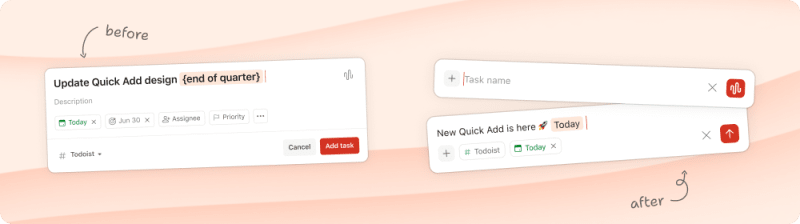
Quick Add opens clean now – project, date, and other task actions show up once you start typing, so nothing sits between you and the task you’re capturing. Everything you already rely on works the same: same natural language dates, same shortcuts, same speed. New: hit ↓ to jump straight to the description, Shift + ↓ for more actions, or { for the deadline picker. See the full list of Quick Add shortcuts. →
Web, macOS, Windows, Linux
- ⭐️ Calendar tasks can now be colored by priority, project, or label, making busy weeks easier to scan – built by Amir.
- ⚙️ Ernesto untangled a sync hiccup where moving a task between workspaces could fail – Todoist now restores it to its original project and explains what happened.
- ⚙️ Ernesto also refined Today so ended calendar events stay visible whenever there’s room, tucking into More only once newer events fill the space.
- 🐛 Ricardo fixed a keyboard navigation quirk so closing a task you opened from Search sends focus back to where you were, instead of an unrelated control.
- 🐛 Ernesto also fixed a focus issue where confirming a discard with
Entercould bump you to the next task instead of keeping you put. - 🐛 Henning addressed an issue where using the deadline keyboard shortcut on a free plan could leave a task in an unsaved state.
- 🐛 Frankie resolved an issue where dragging within a single time slot in calendar week view wouldn’t create a 15-minute task.
- 🐛 Ernesto fixed an issue where selecting Today in the calendar layout could lock you out of navigating to the next week or month.
- 🐛 And rounding out his week, Ernesto made sure assigned tasks stop appearing under “Not Assigned” after a sync.


iOS
- ⭐ Amir added color-coded tasks to the calendar layout – now you can choose whether tasks take their color from projects, priorities, or labels.
- ⚙️ Thanks to Amir, Quick Add on iPhone and iPad now also recognizes
%for labels too, matching Quick Add on Android and the web. - 🐛 Nolan corrected an issue where date-based filter sections could merge together and display the filter query instead of proper date headings.
- 🐛 Nolan also fixed an issue where pulling to refresh a filter wouldn’t show newly due tasks until you closed and reopened it.
- 🐛 Erik fixed an issue where switching audio inputs – like connecting headphones – while Todoist was in the background could cause Ramble to stop working.
- 🐛 Enric resolved an issue where widgets with invalid filter queries would mistakenly show all tasks as complete.
- 🐛 Enric also tackled two resizing issues on iPad: resizing the Todoist window will no longer cause Upcoming to jump to a different day, and projects won’t jump into the sidebar when resizing from a compact window.
Android
- ⭐ Thanks to Carrie, urgent reminders are live on Android. Toggle Urgent on any reminder to set off a full-screen alarm that cuts through Silent and Do Not Disturb, so the stuff you truly can’t miss doesn’t slip by. Learn more →
- ⭐ Amir brought the calendar coloring picker to Android too, so tasks in the calendar layout can now be colored by priority, project, or label.
- 🐛 Pedro S. fixed an issue where project guests weren’t showing up in the task assignee picker for shared team projects.
- 🐛 Pedro S. also addressed a timing issue where rescheduling a task within five minutes of a reminder firing could prevent the new reminder from taking effect.
- 🐛 Afzal fixed the way filter ordering is calculated behind the scenes, so your personal filters now stay in the order you’ve set.
- 🐛 Rasto improved some behind-the-scenes startup work to help the app launch more reliably.
- 🐛 Prateek resolved an issue that could cause the app to crash when completing or moving tasks.
- 🐛 Pedro S. also resolved an issue that was preventing fresh issue reports from generating correctly behind the scenes.

🔢 Versions
Latest versions at the time of publishing: Web v11319; iOS 26.8.11; Android v12250; Android Wear w12203; Desktop 9.30.0
July 16, 2026
📣 New: Insights, now on Pro
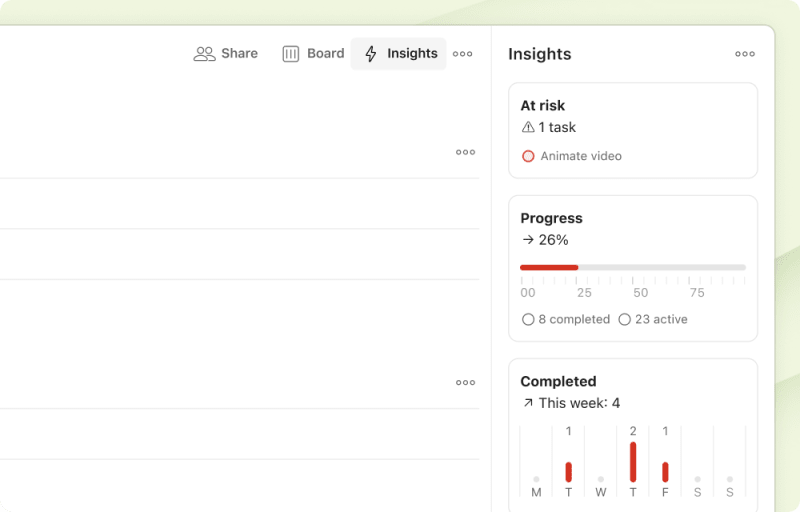
Project Insights – until now a Business-only feature – is available on Pro (Pro Legacy excluded). Open any project, click Insights, and three widgets tell you where things actually stand: what’s at risk, how far along you are, and what you’ve finished this week versus last.
Read the full breakdown to see how it works →
Web, macOS, Windows, Linux
- 🐛 Henning fixed an issue where the compact date header in Upcoming would clip the month and year after scrolling.
iOS
- ⚙️ Enric expanded the week calendar layout in Upcoming to show a full year of past weeks – helpful when you need to reference what happened way back when.
- 🐛 Erik resolved an issue that could prevent sections from reordering properly when dragged in list view.
- 🐛 Paul K. fixed an issue where grouping the Today view would override Smart sort, listing tasks by priority instead of by date and time.
- 🐛 Paul K. also ensured that buttons in the custom recurrence screen are now properly labeled for those using VoiceOver.
Android
- ⭐ Reporting now shows a whole lot more – Carrie added support for tons of new activity event types, bringing it up to speed with other platforms.
- 🐛 Afzal cleared up a quirky visual bug where rescheduling your last overdue task to Today could leave you staring at two identical “Today” headers.
- 🐛 Afzal also resolved an issue where list widgets would jump back to the top after you completed a task – they now hold their position.
- 🐛 Pedro S. fixed an issue where widgets wouldn’t always refresh properly when tasks changed.
🔢 Versions
Latest versions at the time of publishing: Web v11083; iOS 26.7.9; Android v12212; Android Wear w12167; Desktop v9.29.1
July 09, 2026
📣 New: Project and section descriptions
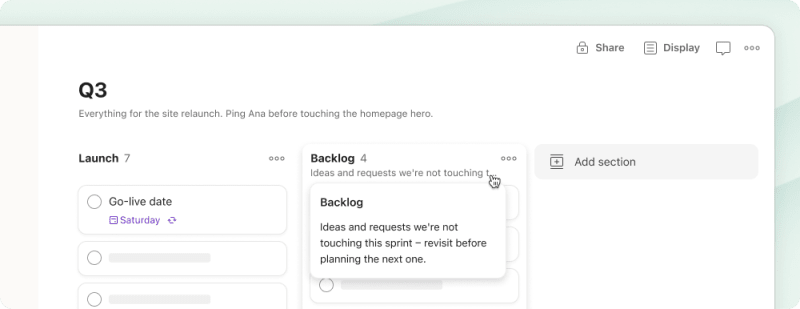
Add a description to any project or section – the goal, the context, the thing you’d otherwise have to re-explain to whoever joins next (or to yourself, three months from now, staring at a section called “Phase 2 stuff” wondering what happened to Phase 1).
Descriptions show as a one-line preview under the name – hover to read the full thing, click to edit. They’re reachable through our API, CLI, and MCP too, so if you’ve connected an AI agent, it already knows what the project’s about without you retyping “this project is about X” into every chat.
Add a description to your projects →
Web, macOS, Windows, Linux
- ⚙️ Luis added a keyboard shortcut – press
iin any project view to open or close the Insights sidebar (provided you have Insights enabled for that project). - 🐛 Henning fixed a board view glitch that could make a column jump around vertically while the inline task composer was open.
iOS
- ⚙️ Hiroki made sure Ramble keeps recording when you switch between Bluetooth devices or AirPods – no more dropped sessions mid-thought.
- 🐛 Enric fixed an issue where invalid filter queries would fail quietly instead of showing you what went wrong.
- 🐛 Erik addressed an issue where weekly goal celebrations and productivity widgets stuck to Monday-based weeks – they now respect your chosen week start day.
- 🐛 Hiroki fixed an issue where Ramble tasks wouldn’t reliably show up after pausing and resuming a session.
- 🐛 Hiroki also resolved a visual glitch where Quick Add could briefly stretch upward while being dismissed.
- 🐛 Hiroki also corrected an issue where tweaking Quick Add settings could accidentally link your desktop completion sound to the mobile preference instead of its own.
Android
- 🐛 Prateek fixed an issue where filters with invalid queries would silently show an empty view – now you’ll see a proper error dialog explaining what went wrong.
- 🐛 Prateek also restored the “Complete & reset sub-tasks” option for recurring tasks with sub-tasks.
🔢 Versions
Latest versions at the time of publishing: Web v11037; iOS 26.7.3; Android v12204; Android Wear w12159; Desktop v9.29.1
July 02, 2026
Web, macOS, Windows, Linux
- ⭐ Luis added
cas a keyboard shortcut to open project comments – the same key you’d use to open task comments. - ⚙️ Seva switched Linux builds to use Wayland by default instead of forcing X11, bringing better compatibility with modern desktop environments.
- ⚙️ He also made Quick Add open instantly instead of waiting to fully load – the window now renders right away when “Reload after each use” is enabled.
- 🐛 On Windows, Seva resolved an issue where opening the app after launching minimized at startup wouldn’t restore your last maximized window state.
- 🐛 And, thanks to Seva, opening a new window will no longer cause offline changes to temporarily vanish from view before the next sync.
- ⚙️ Craig made it so team admins can click their own incomplete onboarding criteria in the People tab to act on them – opening Quick Add, jumping to Inbox, or downloading mobile.
- 🐛 Craig also fixed an issue where clicking the plus icon in the sidebar would whisk you away to a different view instead of opening the Add project modal.
- 🐛 Ricardo fixed a positioning quirk where tasks captured via Ramble, Image Scan, or Text Scan from inside a sub-task hierarchy would drop out of it and land at the root level instead of staying nicely nested.
- 🐛 Ricardo also corrected an issue where dragging a file onto a new sub-task would mistakenly attach it to the parent task’s comments instead.
- 🐛 Rui fixed an issue where Insights widgets could miss updates during rapid changes – they now catch up automatically without needing a sidebar refresh.
- 🐛 Rui also addressed an issue in Reporting where task titles with line breaks would overflow their row instead of truncating neatly.


Android
- 🐛 Prateek corrected a localization bug where widgets would display dates in the wrong language instead of matching your app’s language setting.
- 🐛 He also tackled two sub-task headaches in the task view: collapsed sub-tasks will no longer unexpectedly expand when you select other tasks in select mode, and they won’t stubbornly jump around or reset their position while you're trying to reorder them.
🔢 Versions
Latest versions at the time of publishing: Web v11005; iOS 26.6.24; Android v12194; Android Wear w12149; Desktop v9.29.1
June 25, 2026
Web, macOS, Windows, Linux
- ⚙️ Ricardo added deadline suggestions – type
{in a task and you’ll see a list of deadline dates to pick from, just like!works for priorities. - 🐛 Frankie squashed a freeze that could happen when typing certain values – like “100 000 monthly” – into the task field.
- 🐛 Luis fixed a layout quirk where long section names would overflow their headers and crash into the next column in board layout.
- 🐛 Francesca addressed a keyboard navigation bug where
Cmd/Ctrl + Ewouldn’t open the task editor for overdue tasks. - 🐛 She also ensured that hitting
Enterwhile typing in Japanese or Chinese won’t trigger an accidental search before you’ve finished composing characters. - 🐛 Finally, Francesca patched a glitch where deleting an archived project from the list wouldn’t stick and would reappear upon refreshing.
iOS
- ⭐ Hiroki made it possible to assign tasks to any teammate through Ramble or Task Capture – even if they’re not in that project yet – with a heads-up before you save.
- ⚙️ He also refined how Quick Add decides when to add extra breathing room at the top – now based on available screen space rather than device type.
- 🐛 Continuing his roll, Hiroki corrected the project icons in Quick Add so Inbox and regular projects now display the proper outline style, and resolved an issue where image scan attachments were missing from the share extension. Now you can scan and attach from anywhere.
- 🐛 Enric fixed a bug where tasks with bulleted or numbered lists would lose their formatting when viewed in the calendar layout.
- 🐛 Enric also sorted out an issue where Siri would respond with “Uh oh, something’s wrong” instead of actually adding your task.
- 🐛 Nolan restored the “Me” option to the assignee filter in Today and Upcoming so you can narrow down to just your own tasks.
Android
- 🐛 Sergey adjusted the audio player’s startup timing to prevent a background detection conflict that could interrupt your voice recordings.
- 🐛 Sergey also prevented a crash that could happen if you rotated your device while looking at the Scheduler screen.
- 🐛 Afzal smoothed out the Display menu’s opening animation so the View As and Layout options now appear smoothly with the sheet instead of awkwardly sliding in late.
- 🐛 Prateek un-stuck Ramble’s submit button, which could occasionally lock up mid-thought, and fixed a bug where the Today badge count failed to update when the date rolled over at midnight.
- 🐛 Prateek also resolved a handful of other quirks: unsupported file type attachments will now download properly, the empty comments message won’t overlap your composer buttons, and emailed team invites will now process correctly when accepted.
- 🐛 Rasto corrected the description icon alignment in task details on tablets so it lines up properly with everything else.
🔢 Versions
Latest versions at the time of publishing: Web v10940; iOS 26.6.22; Android v12188; Android Wear w12143; Desktop v9.28.0
June 18, 2026
Web, macOS, Windows, Linux
- ⚙️ Francesca brought back the “Browse templates” option in the sidebar and workspace overview’s Add menu.
- 🐛 Francesca resolved a bug where tasks in public projects would appear blank after closing a task with a long, scrollable description.
- 🐛 She also fixed a quirk where turning on grouping in Today view would override Smart sort with priority order.
- 🐛 Frankie patched a sync glitch that occurred when duplicating a section – or a project containing sections.
- 🐛 Francesca ensured the date picker’s month-navigation arrows advance by exactly one month instead of occasionally skipping ahead.
iOS
- 🐛 Enric removed the Add Task widget from CarPlay’s widget gallery – it was accidentally showing up there despite not being supported.
- 🐛 Nolan corrected a display bug where tasks scheduled with “every 2 workdays” mistakenly displayed “weeks” instead of “weekdays” in the custom scheduler.
- 🐛 Paul K. sorted out a behind-the-scenes issue that could block syncing, ensuring everything now quietly gets back on track when it needs to.
Android
📣 A fresh new look on Android
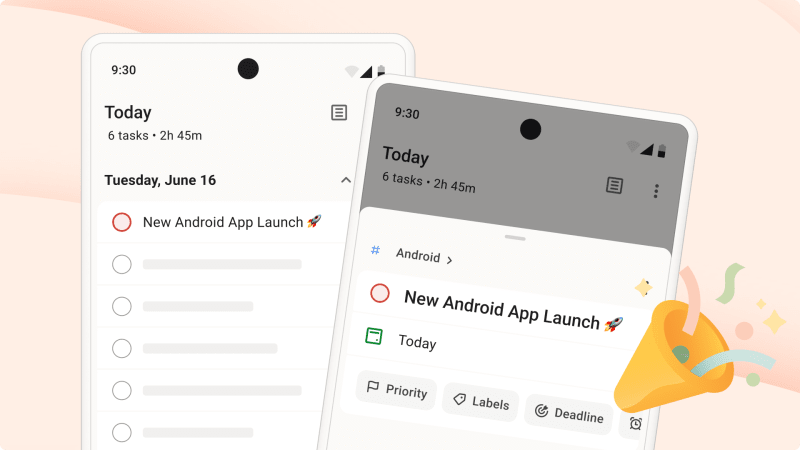
Todoist for Android now feels even more at home on your phone and in your day-to-day work. Better spacing, cleaner typography, and subtle new colors that make everything feel a little more polished and chill for the new Material 3 Expressive UI.
- 🐛 Prateek knocked out two authentication issues: the sign-in screen will no longer auto-launch unexpectedly on Android 10, and the login screen won’t freeze on Android 14 when the credential sheet appears.
- 🐛 Pedro S. fixed a storage bug where files captured through Quick Add were sticking around long after they were sent.
🔢 Versions
Latest versions at the time of publishing: Web v10844; iOS 26.6.11; Android v12178; Android Wear w12133; Desktop v9.28.0
June 11, 2026
Web, macOS, Windows, Linux
- ⭐ Natalie made it possible to edit a task’s title, description, and details directly from the scan preview when capturing tasks from text or images.
- ⚙️ Michael swapped out Twitter-style emoji images for native ones on Windows and Linux – everything now renders in your OS’s own emoji style.
- 🐛 Ricardo stopped Chrome’s password manager from offering to fill credentials when you’re just trying to name a section.

iOS
- ⚙️ Hiroki kept date headers visible for sections that only have calendar events, so you don’t lose track of when things are happening.
- 🐛 Enric cleared up a bug where uncompletable tasks still showed checkboxes in calendar layout – because what’s the point of a box you can’t check?
- 🐛 Witold corrected an issue where VoiceOver would still announce a task as completed even after you’d reopened it.
- 🐛 Erik updated the scheduler icons and renamed “Siri” to “Custom” on watchOS to better reflect what it actually does.
- 🐛 Andris fixed an issue on iPad where dragging a task to a different section would ignore your intended drop position and send it to the end instead.


Android
- 🐛 Prateek fixed an issue where image attachments shared to Todoist from other apps could get stuck instead of uploading to the web.
- 🐛 He also corrected an issue where natural language date parsing wasn’t working properly in Japanese.
- 🐛 Afzal corrected an issue where changes made during drag-and-drop or collapse actions could unexpectedly affect your task list state.
- 🐛 Prateek rolled back a recent credential update that was causing some unexpected hiccups with sign-in and authentication.
🔢 Versions
Latest versions at the time of publishing: Web v10790; iOS 26.6.4; Android v12172; Android Wear w12127; Desktop v9.28.0
June 04, 2026
Web, macOS, Windows, Linux
- ⭐ Seva made it possible to open image files directly in the desktop app – handy for viewing task attachments without jumping to your browser.
- 🐛 A startup issue that could interfere with opening Todoist from external links or command-line arguments was also resolved by Seva.
- 🐛 Francesca fixed an issue where the “Me and unassigned” filter in view options would ignore your other active filters like date and priority.
- 🐛 Reporting also got a fix from Francesca, correcting an issue where task durations showed up in the wrong format.
- 🐛 Pedro A. cleared up an issue where changes to view options (sort, group, layout, and filter) could quietly fail to sync to the server.
- 🐛 Paweł fixed an issue where using keyboard shortcuts on a sub-task in task view would unexpectedly send focus somewhere else entirely.
- 🐛 Nico fixed an issue where up and down arrow navigation didn’t work correctly for tasks opened from the calendar layout.


iOS
- 🐛 Enric resolved an issue where assignee suggestions could mysteriously disappear when using autocompletion in Quick Add.
- 🐛 Tapping the Browse tab while Search is open will now correctly take you back to the root screen, thanks to a navigation fix from Enric.
- 🐛 Hiroki fixed an issue where pasting text into Quick Add and immediately tapping Add could save only part of the title.
- 🐛 Labels differing only by capitalization or accents (like “Home” and “Homé”) are no longer mistakenly treated as identical, courtesy of Hiroki.
- 🐛 Paul K. fixed a quirk where the Turkish “I” (dotless uppercase I, like in “YARIN”) wasn’t being recognized when parsing dates.
- 🐛 To prevent accidentally removing all your Todoist calendar events in one tap, Paul K. added helpful confirmation dialog before stopping calendar sync.
- 🐛 Witold fixed a VoiceOver issue where using the Headings rotor in calendar layout could skip past nearby dates instead of landing on the next one.
Android
- 🐛 Prateek cleared up an issue where List view could show a ‘custom layout’ badge even when you hadn’t actually customized any view options.
🔢 Versions
Latest versions at the time of publishing: Web v10729; iOS 26.5.27; Android v12164; Android Wear w12119; Desktop v9.28.0
May 28, 2026
Web, macOS, Windows, Linux
- 🐛 Pedro A. fixed an issue where moving a task to a different project while also editing its content, date, or priority could cause those edits to disappear.
- 🐛 Frankie cleared up a quirk where the “Add section” option would appear even when you’d grouped a project – which doesn’t support sections.
- 🐛 Francesca corrected an issue where completed tasks from archived projects would linger in Today and Upcoming views until you manually refreshed.
- 🐛 Ricardo fixed an issue where the discard confirmation dialog in Quick Add could appear twice when navigating away with unsaved text.
- 🐛 Francesca solved an issue where converting a scheduled task to recurring would shift it to a different time instead of anchoring to your selected date.
- 🐛 Francesca also corrected the keyboard navigation order in board layout so it flawlessly follows the visual task sequence when “group by” is active.
iOS
- ⚙️ Erik expanded Reporting to track more event types – and added filters so you can actually find what you’re looking for.
- 🐛 Erik also fixed an issue where deadline changes weren’t appearing in Reporting – now you can track every shift and extension.
- 🐛 Hiroki fixed a bug where pasting events from the calendar into Quick Add could squish the title, time, and location together into one unreadable mess.
- 🐛 Paul K. corrected an issue where filters with date grouping could overlook overdue tasks that had only a deadline – those now show up properly in Overdue.
- 🐛 Paul K. also ensured that comment attachments are now properly announced when navigating with VoiceOver.
- 🐛 Andris fixed an issue where editing a custom recurrence – like adding an end date – would quietly strip away the scheduled time from your repeating task.
Android
- 🐛 Olga corrected an issue where Quick Add reminders weren’t working properly for tasks assigned on free plans.
- 🐛 Carrie fixed an issue where Quick Add could close unexpectedly when using a hardware keyboard.
- 🐛 Rasto fixed an issue where sorting by deadline in descending order wasn’t properly ordering overdue tasks that only had dates (no deadlines).
- 🐛 Prateek made sure uncompletable tasks no longer show a circle icon in Today and Upcoming’s calendar layout.
- 🐛 Prateek also hid the “Add section” action for projects with grouping enabled – it wasn’t meant to appear there anyway.
- 🐛 Pedro S. resolved a background issue that could occasionally make the app unresponsive when scheduling work behind the scenes.

🔢 Versions
Latest versions at the time of publishing: Web v10677; iOS 26.5.19; Android v12156; Android Wear w12111; Desktop v9.27.1
May 21, 2026
Web, macOS, Windows, Linux
- ⚙️ Francesca added “Weekdays” as an option in the custom scheduler – perfect for those Monday-through-Friday recurring tasks.
- ⚙️ Francesca also made sure task details now display full assignee names instead of the shortened versions.
- ⚙️ Craig added a bit of motion to folder icons – they now animate when you click on them.
- 🐛 Pedro A. cleared up an issue where deleted task comments could mysteriously reappear after syncing.
iOS
- 🐛 Paul K. fixed an issue that could interrupt things on iPad when adding labels to a task after searching for them.
- 🐛 Hiroki made sure that tasks created via Ramble or task capture properly inherit any dates or labels you’ve already entered into Quick Add before starting your session.
Android
- 🐛 Rasto fixed a crash that could happen when you tapped “Read All” to mark your notifications as read.
- 🐛 Pedro S. fixed an issue where Ramble couldn’t parse incoming messages.
- Prateek went on a serious troubleshooting sweep. Thanks to him:
- 🐛 Tasks will no longer randomly duplicate themselves after an app update.
- 🐛 Typing “every! 2 workdays” will now correctly parse as “Every 2 Weekdays” instead of shifting to “Every 2 Weeks.”
- 🐛 Recurring times with single-digit minutes (like “21:0”) will now parse perfectly every time.
- 🐛 Accepting a team invite during signup will now successfully connect you to the team right away, rather than leaving you stranded.
🔢 Versions
Latest versions at the time of publishing: Web v10614; iOS 26.5.13; Android v12148; Android Wear w12103; Desktop v9.27.1
May 14, 2026
Web, macOS, Windows, Linux
- ⚙️ Seva expanded the key options available when setting up global shortcuts in the desktop app.
- 🐛 Ricardo corrected an issue where date parsing in task capture wasn’t respecting your format preferences.
- 🐛 Rui cleared up an issue where moving a task between projects would show up twice in Reporting.
- Francesca went on a massive bug-squashing pass this week. Thanks to her:
- 🐛 Attachments added during Quick Add in the board layout will now correctly save to the task.
- 🐛 Chrome will stop helpfully (but incorrectly) suggesting passwords when you’re just trying to add a section.
- 🐛 Reporting tooltips will stay firmly anchored in place instead of drifting away from their trigger.
- 🐛 Clicking the same date twice will no longer cause the date picker to hop out of place and back.
- 🐛 The
JandKshortcuts will keep working smoothly after you switch from calendar to list or board layout.
iOS
- ⭐ Luis brought the two-finger drag gesture to board layout – swipe across a column to enter multiple selection mode, just like you can in list and agenda layout.
- ⚙️ Enric tweaked the bottom padding on the Tasks widget for iPhone SE running iOS 26, squeezing in an extra row.
- ⚙️ Enric also added a label icon to each label displayed in task rows, making it easier to spot labels at a glance.
- 🐛 Enric then corrected how labels display in board layout cards so they now use all available space instead of getting cut off prematurely.
- 🐛 Witold improved the task comments’ attachment menu to better match Quick Add – with more consistent ordering and proper support for non-default text sizes.
- 🐛 Witold corrected the Ramble widget and Control Center to display text in your language instead of defaulting to English.
Android
- 🐛 Carrie fixed an issue where deadline changes weren’t showing up properly in Reporting.
- 🐛 Kris resolved a behind-the-scenes issue that could prevent subscription information from saving properly when storage gets cleared.
🔢 Versions
Latest versions at the time of publishing: Web v10559; iOS 26.5.8; Android v12138; Android Wear w12093; Desktop v9.27.1
May 07, 2026
Web, macOS, Windows, Linux
- ⭐ Amir added support for Czech 🇨🇿 and Turkish 🇹🇷 smart date parsing – type dates naturally in either language and watch them work their magic.
- ⚙️ Francesca made delete and archive confirmations more transparent – they now list out sub-project names so you know exactly what you’re about to change.
- 🐛 Seva corrected an issue where the calendar sidebar could scroll horizontally – it now stays neatly within its lane.
- 🐛 Francesca corrected how productivity streak dates are read, so your streak now displays accurately no matter what timezone you’re in.
- 🐛 Francesca also shipped a couple of Reporting fixes: clicking a project or section chip will now correctly take you there, and deadline changes will no longer be mistakenly logged as priority changes.
- 🐛 Craig ensured calendar card details now open with keyboard focus too – not just on mouse hover.
- 🐛 Craig also resolved an issue where expand/collapse toggle buttons weren’t properly announced by screen readers for those using assistive technology.
- 🐛 Craig then fixed an issue where having localStorage disabled caused the OAuth permission page to appear blank, breaking third-party integrations like Slack.
- 🐛 Scott fixed an issue where long external calendar events could drift on top of timed tasks in calendar layout after reprioritizing.
- 🐛 Nico solved an issue where completed tasks assigned by teammates wouldn’t show up in shared project calendar layouts.

iOS
- 🐛 Nolan fixed an issue where your cursor would jump to the end of the text while editing a task’s title or description.
- 🐛 Witold fixed an issue where creating a task right after making a new project through Quick Add’s `#` shortcut left the submit button unresponsive.
- 🐛 Paul K. corrected an issue where undoing a recurring task completion could mistakenly bump up your completed task count.
- 🐛 Erik resolved several Quick Add layout issues, ensuring the view behaves perfectly when rotating your iPad, using the emoji keyboard, or when using certain third-party keyboards.
Android
- ⭐ Rasto added date parsing support for Czech and Turkish, so Quick Add now understands natural language dates in both languages.
- ⚙️ Text across the app now matches our design system more closely, courtesy of some behind-the-scenes typography updates from Carrie.
- ⚙️ Carrie also refreshed the app and Wear icons with updated designs, replacing outdated assets with the latest versions from our shared design system.
🔢 Versions
Latest versions at the time of publishing: Web v10472; iOS 26.5.0; Android v12130; Android Wear w12085; Desktop v9.27.1
April 30, 2026
Web, macOS, Windows, Linux
- ⭐ Rui expanded Reporting to capture 15 new event types – priority and duration changes, task moves between sections and projects, and project lifecycle moments like archiving and sharing.
- ⚙️ Michael updated the emoji picker with 135 new additions from Unicode 13.1 through 17 – including 🫠, , 🫨, and 🥱.
- ⚙️ Michael also streamlined the voice recorder in comments – tap the mic button and you’re recording immediately, just like in Ramble.
- 🐛 Henning restored the drag-to-scroll zone at the edge of the weekly calendar – it now works as expected even when the sidebar is open.
- 🐛 Pedro A. corrected an issue where your daily or weekly goal celebration could get dismissed before you ever saw it.
- Francesca went on a bug-squashing spree this week! Thanks to her, we’ve got a whole batch of fixes:
- 🐛 Switching to Smart sort order will now save properly instead of reverting after a sync.
- 🐛 Sub-tasks will no longer vanish from Board view when grouping by custom properties like priority.
- 🐛 The inline task editor will no longer hide below the viewport when opened via a keyboard shortcut at the bottom of a long list.
- 🐛 Scrolling inside a task context menu in calendar layout will no longer scroll the calendar behind it.
- 🐛 Empty sections will no longer show up in filtered views when there are no matching tasks.
iOS
- ⭐ Erik updated the workspace overview with project progress bars and teammate avatars, so you can see how work’s moving along at a glance.
- 🐛 Hiroki resolved an issue where date parsing could get confused when switching between languages mid-flow.
- 🐛 Hiroki also cleared up a sync loop that could happen after completing a repeating task and then restoring it from your completed task history.
- 🐛 Jaime corrected a color contrast issue that made project and section names hard to read when sharing from Safari to Todoist’s dark theme on iPad.
- 🐛 Erik fixed an issue where the autocomplete view would disappear when your keyboard resized itself mid-typing.
- 🐛 Andris fixed VoiceOver’s Links rotor to properly detect inline links in task descriptions and improved how links are pronounced in task titles.
- 🐛 Paul K. fixed an issue where the Overdue button in the week calendar layout would linger even after you’d completed all your overdue tasks.
- 🐛 Paul K. also corrected an issue where filters using `!search:*` showed no results – turns out asterisks needed to be treated as literal characters, not wildcards.

Android
- 🐛 Prateek fixed an issue where rotating your device while drafting in Quick Add could prevent tasks from saving.
- 🐛 Olga corrected an issue where location reminders with unusual radius values wouldn’t trigger properly.
- 🐛 Olga also addressed a behind-the-scenes startup issue that could occasionally make the app unresponsive at launch.
- 🐛 Pedro S. fixed an issue where tapping a highlight to remove it wouldn’t work – the text would shift just enough to dodge your tap.
🔢 Versions
Latest versions at the time of publishing: Web v10425; iOS 26.4.23; Android v12122; Android Wear w12077; Desktop v9.27.1
April 23, 2026
📣 New: Insights, Reporting, and a dedicated People tab
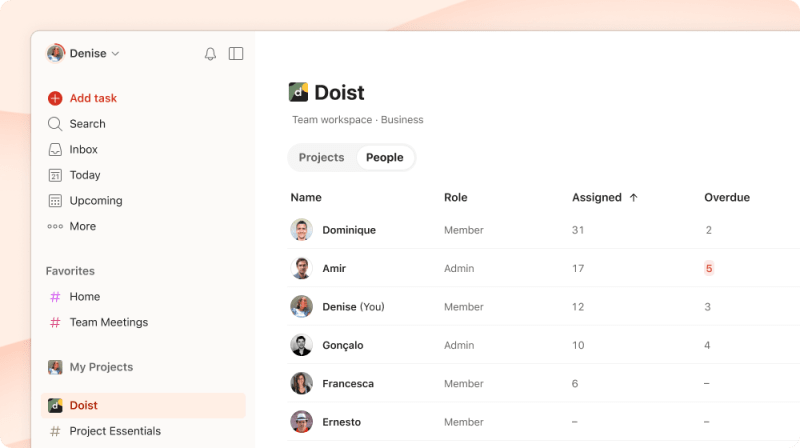
Gone are the days of digging through dozens of projects just to see what everyone is up to. We’ve rolled out three features to give you instant, birds-eye visibility into your team:
From tracking workloads in the new People tab and uncovering team trends with Insights, to staying on top of daily updates with the freshly overhauled Reporting – you now have a much clearer picture of how everything fits together.
Read the full breakdown to see how they work →
Web, macOS, Windows, Linux
- ⭐ Craig opened up the People tab to everyone on the team – admins and members – so everyone can get a bird’s-eye view of the team’s workload.
- ⚙️ Craig also upgraded the People tab workflow: When you’re looking at a teammate’s filtered task list, you can now add new tasks or create projects right from that view.
- ⚙️ Francesca extended the
Shift + Gshortcut – now you can jump to a task inside its project from task detail view, not just list views. - ⚙️ Craig added a resend option for team admins – nudge pending invites directly from the People tab or Settings when someone needs a reminder.
- 🐛 Rui corrected a quirk where deleting an emoji from a prefilled label name took two
Backspacepresses instead of one.
iOS
- ⭐ Hiroki taught Ramble to understand assignees – now you can delegate tasks just by describing who should handle them (as long as they’re already in the project).
- ⭐ Erik added project health insights to the workspace overview – now you can see how all your team projects are tracking without opening each one individually.
- ⚙️ Erik made the Reporting view remember your last set of filters, so you can pick up right where you left off each time you return.
- 🐛 Paul K. fixed an issue where Ramble wouldn’t start recording when launched via Siri with AirPods connected.
Android
- ⚙️ Carrie refreshed the app’s icons to match the latest design standards – a small visual update that keeps everything looking current.
- 🐛 Julia P. fixed an issue where you could modify Insights – enabling, disabling, or updating health – in projects you hadn’t actually joined.
- 🐛 Prateek fixed an issue where priority changes weren’t showing up properly in Reporting.
- 🐛 Prateek also fixed the copy link button in project sharing so you can actually copy the project URL to your clipboard again.
🔢 Versions
Latest versions at the time of publishing: Web v10380; iOS 26.4.17; Android v12116; Android Wear w12071; Desktop v9.27.1
April 16, 2026
📣 New in Ramble: Assign tasks via voice capture
Ricardo and Pedro S. added assignee support to Ramble on Web and Android – you can now delegate tasks to anyone sharing that project directly while capturing with your voice. (iOS support is landing soon!)
Web, macOS, Windows, Linux
- ⭐️ Ricardo added assignee support to Ramble voice capture, so you can delegate tasks to teammates in your project as you dictate them.
- 🐛 Rui resolved an issue that prevented drag-and-drop sorting in board views whenever you had filters active.
- 🐛 Rui also ensured your project layout preferences now stay put when you save project settings – no more unexpected resets.
- 🐛 Seva corrected a navigation issue that could cause problems when switching between windows.
- 🐛 Seva fixed an issue where template links weren’t opening correctly when clicked from outside the app.
- 🐛 Seva resolved an issue where unexpected notification types could cause problems – everything now handles gracefully behind the scenes.
- 🐛 Seva corrected an issue where window controls appeared in the wrong spot on macOS when opening new windows.
iOS
- 🐛 Witold corrected an issue where changing the repeat schedule for multiple tasks at once would quietly ignore your update if those tasks already had a date.
- 🐛 Hiroki fixed a bug where Ramble could look like it was still recording even after a session had already ended.
- 🐛 Paul K. fixed a bug that prevented labels with special characters (like “&” or “#”) from being deleted.
- 🐛 Paul K. fixed an issue where rescheduling a single task in Today or Upcoming would mess with your manual sort order.
- 🐛 Jaime updated the task delete confirmation on iOS to warn that deletions are permanent – bringing it in line with Android and web.
Android
- ⭐ Pedro S. added assignee support to Ramble voice capture, allowing you to assign tasks to anyone sharing that project while you’re capturing on the go.
- ⚙️ Luis updated the task move icon to match our design system – a small polish that keeps everything looking cohesive.
- 🐛 Olga resolved a crash that could happen when connecting to Google Play billing.
- 🐛 Kris fixed a bug where the task action menu would mysteriously hide itself when no tasks were selected.
- 🐛 Pedro S. fixed a loop that kept showing the timezone prompt even after you’d already accepted the suggested timezone.
- 🐛 Rasto cleared up some startup issues that could cause the app to freeze when launching.
- 🐛 Prateek fixed an issue where tapping a deleted task in the activity log would resurrect it back into your Inbox.
- 🐛 Olga cleared up a background loop that was quietly filling up logs with cancellation messages – nothing you’d notice, but your device will appreciate it.
- 🐛 Olga also made a round of improvements to location reminders – they should trigger more consistently now.
🔢 Versions
Latest versions at the time of publishing: Web v10330; iOS 26.4.12; Android v12108; Android Wear w12063; Desktop v9.27.1
April 09, 2026
Web, macOS, Windows, Linux
- 🐛 Craig corrected an issue where ‘date after:’ and ‘due after:’ filters with specific times would mistakenly include tasks that had no time set.
- 🐛 Craig also fixed a bug where deadline dates in the task activity log appeared a day early for anyone in a timezone behind UTC.
iOS
- ⚙️ Witold improved the Sync Issues screen to show you why something didn’t sync – such as hitting a project’s task limit – and ensured that error messages (like entering the wrong password) show helpful text instead of cryptic codes.
- 🐛 Witold also fixed a quirk where the #TodoistZero celebration and empty project view could appear in the wrong theme.
- 🐛 Then, Witold restored Filter Assist, which had stopped generating filters from natural language descriptions; it’s now back to translating your thoughts into working filters.
- 🐛 Hiroki improved how screen readers handle file attachments by focusing the whole attachment and reading the name and size together for clearer navigation.
- 🐛 Hiroki fixed an issue where sharing text and markdown files through the Share extension wasn’t working properly and ensured small file attachments in Quick Add now display KB or Bytes instead of “0 MB”.
- 🐛 Andris cleared up a visual glitch where swiping to complete a task caused neighboring checkboxes and content to flicker during the animation.
- 🐛 Jaime fixed an issue where the “Show All” button in comments was unreachable with VoiceOver when the last comment included a file attachment.
Android
- ⭐ Julia P. added project health and progress insights to the workspace overview, so you can spot what needs attention without opening every project.
- ⚙️ Afzal made sure sync errors now show a clear explanation when you’ve hit a project’s task limit.
- 🐛 Prateek resolved an issue where team project folders appeared empty after a restart and fixed Polish date parsing for “za X minut” for paid accounts.
- 🐛 Olga cleared up a background issue that could prevent Karma from saving properly.
- 🐛 Rasto fixed an issue where Quick Add would sometimes highlight the wrong text after you selected an autocomplete suggestion.
- 🐛 Pedro S. fixed an issue where tapping Ramble on your watch would open the screen even when you’d reached your session limit.
- 🐛 Carrie fixed a bug where the timezone dialog would pop up unexpectedly after daylight saving time changes, even when your timezone hadn’t actually changed.
🔢 Versions
Latest versions at the time of publishing: Web v10282; iOS 26.4.8; Android v12100; Android Wear w12055; Desktop v9.26.4
April 02, 2026
Web, macOS, Windows, Linux
- ⚙️ Frankie improved Ramble error messages to give you specific guidance based on what went wrong – whether it’s a connection hiccup or an unexpected session end.
- 🐛 Craig fixed a misalignment issue with time labels in calendar layouts (Today, Upcoming, and Project views) and resolved a bug where opening the sidebar in mini mode would block the main content with a solid grey overlay.
iOS
- ⚙️ Nolan updated the forward and back button icons in our web views to larger chevrons that are easier to spot and tap.
- 🐛 Paul K. fixed an issue where moving a project from My Projects to a team’s workspace didn’t let you pick which folder to place it in.
Android
- ⚙️ Pedro S. added markdown support to Task capture – bold, italics, and links now carry over when you capture tasks from text or images.
- ⚙️ Kris sped up Quick Settings tile launches, making it noticeably faster to add tasks directly from your notification shade.
- 🐛 Pedro S. fixed a bug where tapping the Ramble complication could open multiple screens at once instead of just one.
- 🐛 Pedro S. also resolved an issue where Wear OS complication shortcuts were opening the wrong screen.
- 🐛 Prateek fixed an issue where weekly progress ignored your custom week start day and defaulted to Monday instead.
- 🐛 Prateek also corrected the grammar in Insights so it now says “+1 task” instead of “+1 tasks” – because even small details matter.
- 🐛 Julia P. resolved a crash that could happen when dragging and dropping tasks.
🔢 Versions
Latest versions at the time of publishing: Web v10222; iOS 26.3.29; Android v12094; Android Wear w12049; Desktop v9.26.4
March 26, 2026
Web, macOS, Windows, Linux
- ⚙️ Moving a personal project to your team? Craig added folder selection to the modal so you can organize it exactly where it belongs.
- ⚙️ Dominique switched the Completed widget in Project Insights to a rolling four-week view – complete with a handy comparison to the previous period to track your momentum.
- ⚙️ Francesca refreshed the confetti animation for completed goals with a smoother look that matches the mobile experience.
- ⚙️ Ben tidied up the Assigned card: teammates with zero tasks now appear as a single grouped item instead of cluttering the list separately.
- 🐛 Craig restored the
+assignee shortcut in Quick Add for team projects and ensured that the fix for “every!” recurring tasks now also extends to future occurrences, so they schedule from the current date rather than the wrong one. - 🐛 Craig fixed a bug where pressing
Escapeafter creating a task would unexpectedly jump focus to the “Add task” button instead of staying put. - 🐛 Craig also ensured that capturing tasks from text now respects your date format settings (a little fix for a Task Capture capability coming soon! 👀).
- 🐛 Craig also resolved several navigation and sync issues: deleting parent tasks no longer breaks keyboard focus, arrow keys now move through board layouts in the correct order, and the app now correctly handles brief connection drops or waking from sleep without requiring a manual refresh.
- 🐛 Frankie corrected the confirmation dialog to show a person’s actual name instead of “collaborator” and fixed an accessibility issue where drag-and-drop containers were incorrectly marked as disabled for screen readers.


iOS
- ⚙️ Hiroki improved Ramble’s error handling to provide specific, helpful guidance when encountering issues.
- 🐛 Witold fixed a bug where completed subtasks were hiding from view even when you explicitly asked to see them.
- 🐛 Enric ensured the date picker always defaults to a future time when creating reminders – no more accidentally trips to the past.
- 🐛 Enric also resolved a hang that occurred when opening Quick Add, so you can get back to capturing tasks without a hitch.
Android
- ⚙️ Prateek improved error handling in Ramble so you get clearer feedback when things don’t go as planned.
- 🐛 Prateek also brought Filter Assist back to life – it’s working again after a brief hiatus.
- 🐛 Prateek further stabilized the experience by resolving: a reminder-related crash that could interrupt your alerts, fixing an interruption when adding multiple tasks in Quick Add, and ensuring deadline chips now appear correctly in search results.
- 🐛 Pedro S. fixed an issue where task dates could shift unexpectedly when changing timezones and corrected a bug where text highlights would disappear or appear in the wrong places.
🔢 Versions
Latest versions at the time of publishing: Web v10142; iOS 26.3.21; Android v12088; Android Wear w12043; Desktop v9.26.4
March 19, 2026
Web, macOS, Windows, Linux
- ⚙️ Assigning tasks across multiple projects? Frankie made it so you can now pick any teammate, with a heads-up showing which projects they’ll be added to.
- 🐛 Craig ensured that postponing “every!” recurring tasks now reschedules them from today – rather than the original due date – and resolved an issue where custom times would occasionally drop during a reschedule.
- 🐛 Craig also tidied up a bug where calendar event cards could peek outside their bounds when scrolling through your week.
- 🐛 Thanks to Craig, the Inbox now correctly matches your language settings in filters and task lists, and breadcrumbs now display your full project ancestry – no matter how deep your nested sub-projects go.
- 🐛 Frankie restored the “Assign to…” option when multi-selecting tasks in team projects, even for those working solo in a project for now.
iOS
- 🐛 Erik ensured that tapping calendar events now opens them directly in your external calendar app as expected.
- 🐛 Witold updated search results to sort by priority and project order instead of keyword placement, matching what you’re used to on web.
- 🐛 Enric resolved a crash that prevented launching Todoist on visionOS.
- 🐛 Enric also fixed an issue that blocked tasks from opening while screen mirroring was active.
- 🐛 Paul K. smoothed out a bug where deadline-only tasks could show up in the wrong section – or worse, appear twice – when grouping by date.
- 🐛 Erik and Paul K. improved the VoiceOver experience: The attachment and keyboard buttons are now fully detectable in comments, and task deadlines are announced across all views for a more reliable screen-reading experience.
Android
📣 New: Just talk to your wrist with Ramble on Wear (Beta) ⌚
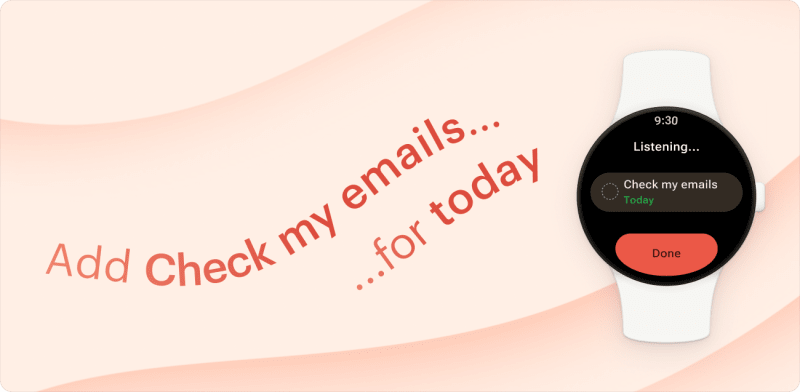
Ramble, our natural language voice capture, is now available on Android smartwatches in beta. Just tap, talk, and watch your words turn into structured tasks with dates and priorities. See how it works →
- 🐛 Kris restored the assignee picker to full health in the Today and Upcoming views.
- 🐛 Rasto patched a crash that could occur on Wear devices when returning to task creation after picking a date or time.
- 🐛 Julia P. brought order to search results, ensuring they follow the same sensible sorting logic found on Todoist for web.
🔢 Versions
Latest versions at the time of publishing: Web v10065; iOS 26.3.18; Android v12080; Android Wear w12035; Desktop v9.26.4
March 12, 2026
Web, macOS, Windows, Linux
This week, Craig went on a mission to iron out the kinks in your calendar and sync:
- 🐛 Fixed an issue where postponing overdue recurring tasks with hourly patterns would reschedule from the current time instead of the original date.
- 🐛 Resolved a quirky bug where Google Calendar events spanning midnight would sometimes hide behind other events in the calendar layout.
- 🐛 Smoothed over a transition glitch in the Upcoming calendar where Daylight Saving Time would desync the current time indicator and schedule tasks an hour later.
- 🐛 Patched a sync lag where changes from other devices wouldn’t appear in the web app until you made a local edit.
- 🐛 Rescued the date picker in the Chrome extension, which was getting cut off at the bottom and hiding your time and recurrence options.
And a quick duration fix from Frankie:
- 🐛 Cleared up a confusing moment in the duration field where typing more than 23h59m would briefly convert to a day-based value before snapping back to the correct limit.
Android
- 🐛 Kris improved crash reporting for a rare inbox-related issue, making it easier to track down and fix if it happens again.
- 🐛 Kris also fixed the wonky vertical alignment of highlights in Quick Add.
- 🐛 Carrie fixed a behind-the-scenes date handling issue to keep everything running smoothly. One of those fixes you won’t notice, which means it’s working.
🔢 Versions
Latest versions at the time of publishing: Web v10011; iOS 26.3.5; Android v12072; Android Wear w12027; Desktop v9.26.4
March 05, 2026
Web, macOS, Windows, Linux
- ⚙️ Craig added new keyboard shortcuts for the Deadline field: press
dto open the deadline picker andShift + Dto remove a deadline. - 🐛 Pedro A. resolved a syncing issue where deleting, renaming, or collapsing archived sections and completed tasks wouldn’t stick. Your cleanup work now saves properly.
- 🐛 Craig corrected a quirk where
Shift + Ain Today view would add your first task at the top, then inexplicably dump the rest at the bottom. - 🐛 Craig also addressed a bug that caused the Location option to show up twice after reordering items in Quick Add settings.
- 🐛 Frankie fixed a crash that prevented the App Management section in Integration settings from loading.
- 🐛 Frankie also resolved an issue where your theme, sidebar state, and recurring task settings could randomly reset during a re-sync.
- 🐛 Craig ensured that pressing
Cmd/Ctrl + Backspacefrom a sub-task’s context menu now deletes only that sub-task, rather than the parent. - 🐛 A missing “Copy link to section” option has been reinstated by Craig for newly created sections.
🔢 Versions
Latest versions at the time of publishing: Web v9968; iOS 26.2.31; Android v12064; Android Wear w12019; Desktop v9.26.4
February 26, 2026
Web, macOS, Windows, Linux
- 🐛 Frankie fixed a quirk where overdue tasks in Today view ignored date order when you had manual sorting turned on. They now line up chronologically, as intended.
- 🐛 Frankie also fixed a bug where “Add filter below” would send your new filter to the bottom of the list instead of right where you wanted it.
iOS
- ⭐ Enric added three new App Shortcuts – Open Ramble, Open Today, and Open Upcoming – so you can jump straight to where you need to be right from Siri or the Shortcuts app.
- 🐛 Witold fixed wildcard searches in filters. Queries like “search:egg*” or “search:*milk” now actually return results instead of coming up empty.
- 🐛 Witold fixed date-based filters like “within 5 days” or “within -5 days” so they accurately display tasks due today plus the next or previous four days.
- 🐛 Hiroki fixed a bug where Ramble’s date parsing could misinterpret dates in non-English languages, so your tasks land on the right day every time.
- 🐛 Erik fixed a glitch where calendar days would awkwardly overlap when switching from week to month view.
- 🐛 Erik fixed a crash that happened when duplicate events appeared across multiple calendars.
- 🐛 Paul K. fixed an issue where toggling the Completed Tasks switch in the Display menu had no effect when using VoiceOver.
Android
- 🐛 Prateek squashed a sneaky test bug that was making our workspace project deletion checks fail randomly. Behind-the-scenes fix, but it keeps our code healthy.
- 🐛 Julia P. fixed a bug that prevented themes from applying correctly on certain devices.
- 🐛 Sergey fixed a bug that prevented the My tickets screen from opening.
- 🐛 Rasto built in a recovery sync that quietly gets Todoist back on track if something goes wrong in the background.
- 🐛 Prateek fixed a bug where “Next week” would vanish from Quick Add options if you had a one-day weekend set up.
- 🐛 Afzal fixed a bug that left Samsung widgets perpetually loading.
🔢 Versions
Latest versions at the time of publishing: Web v9904; iOS 26.2.23; Android v12056; Android Wear w12011; Desktop v9.26.4
February 19, 2026
Web, macOS, Windows, Linux
- 🐛 Ricardo fixed a bug where pasting multiple lines would duplicate automatic reminders on each new task when a due time was already set.
- 🐛 Craig fixed a quirk where hitting down arrow after using
G /to jump to a section would land you on the project’s first task instead of the section’s. - 🐛 Craig also solved a bug where filters using wildcard searches (“search:*”) mysteriously stopped working on the web app.
- 🐛 Frankie fixed a bug where the MFA verification modal kept popping back up after you’d already changed your email address.
- 🐛 Rui fixed a sneaky bug where project insights conveniently forgot about week 5, giving you incomplete completion totals for those longer months.
- 🐛 Ricardo fixed those formatting buttons that weren’t highlighting properly when you selected bold or italic text.
- 🐛 Francesca fixed a quirk where free users couldn’t accept invitations to a 6th or 7th project.
- 🐛 Seva fixed a behind-the-scenes issue that was preventing widgets from completing tasks properly.
- 🐛 Seva also fixed a resizing issue affecting the macOS app.
iOS
- ⚙️ Enric made scheduling reminders smoother by improving the “Before task” screen.
- 🐛 Enric also cleaned up an accessibility bug where toggle switches were announcing “Urgent” even when that label wasn’t visible.
- 🐛 Paul K. made sure your location and time reminders are now clearly distinguished – tasks with just a location show a map pin, while those with both display both icons.
- 🐛 Hiroki tackled an issue where your most recent photo wouldn’t attach if it was stored in iCloud.
- 🐛 Thanks to Witold, the back and forward buttons now work reliably when navigating the help center from the app.
- 🐛 Hiroki updated Ramble’s microphone permission screen to meet App Store guidelines, keeping everything running smoothly behind the scenes.
- 🐛 Paul K. fixed an issue where task names would spill into neighboring days when your calendar was packed with overlapping durations.
- 🐛 Enric fixed the bottom padding on the small Tasks widget for iOS 26, so it looks properly aligned again instead of awkwardly cut off.
- 🐛 Hiroki added the missing Czech localization file, so Czech users on iOS will see proper system strings instead of English fallbacks.
Android
- 🐛 Prateek fixed Ramble animations to respect your accessibility settings, so they’ll stay put when you’ve turned off motion effects.
- 🐛 Kris tackled a startup crash that could freeze the app before you even got started.
- 🐛 Pedro S. sped up bulk rescheduling so moving multiple tasks to new dates actually happens at the speed you’d expect.
- 🐛 Rasto cleaned up the calendar layout by removing the collapse/expand buttons that didn’t belong there.
- 🐛 Pedro S. fixed an issue where Quick Add would stop responding after the app returned from the background.
- 🐛 Prateek fixed a bug where toggling email notification settings in Android wouldn’t stick properly.
- 🐛 Rasto fixed template deep links from My templates so they actually work now.
- 🐛 Sergey fixed that annoying issue where the Scheduler would jump around while scrolling through periodic tasks.
🔢 Versions
Latest versions at the time of publishing: Web v9881; iOS 26.2.19; Android v12050; Android Wear w12005; Desktop v9.26.4
February 13, 2026
Web, macOS, Windows, Linux
- ⚙️ Craig added the ability for search filters to recognize wildcard characters, making it easier to find tasks with specific keywords.
- 🐛 Francesca resolved an issue in the calendar that allowed completed tasks to be accidentally dragged to a different date.
- 🐛 Rui fixed an issue where the Completed widget in Project Insights was mapping task counts to the wrong days of the week and ignoring your preferred start of week setting.
- 🐛 Henning sorted out a bug where hitting
EnterorSpaceon the “Remove date” button would inexplicably open the date picker instead of, you know, removing the date. - 🐛 Pedro A. fixed an issue where clicking on a recent location when setting a location reminder wouldn’t work if you held the mouse button down for too long.
- 🐛 Thanks to Ernesto, you can now interact with toast notifications without accidentally clearing your carefully curated task selections.
- 🐛 Natalie ensured completed tasks load properly in calendar layouts, even when looking further than two months out.
- 🐛 A bug that accidentally deleted task names while retyping parsed dates in Firefox has been resolved by Craig.
- 🐛 Craig also made sure task comments no longer disappear after a full sync.
- 🐛 And, thanks to Craig, the activity log now correctly displays task names instead of raw
{task}placeholders if you’ve set your language to Turkish. - 🐛 Frankie fixed an issue where the assignee picker incorrectly pre-selected “Unassigned” when multiple tasks with different assignees were selected. Now the picker shows no pre-selection.
iOS
- ⚙️ Witold made selecting times a breeze by showing times in 5-minute intervals instead of forcing you to scroll through every single minute.
- ⚙️ Hiroki made sure your task view stays put, even when you mark the task as complete.
- 🐛 Paul K. fixed an issue where the Quick Add autocomplete popup looked too light in dark mode on iOS 26. Now your late-night task creation stays nice and dark.
- 🐛 Erik fixed an issue where calendar events appearing in multiple shared calendars were merged instead of displayed separately.
- 🐛 Enric fixed an issue where quickly tapping the task circle wouldn’t always complete your tasks.
- 🐛 Witold fixed an issue that would sometimes prevent Ramble from starting, especially when launching via Siri.
Android
- ⚙️ Rasto made sure your Wear complications show a default state when caches fail to load.
- 🐛 Thanks to Julia P., you’ll never miss a recurring task reminder again, even after a device reboot.
- 🐛 Pedro S. made location reminders more reliable, so you can always count on your reminders to trigger exactly when and where you need them.
- 🐛 Olga sorted out an issue where task sorting by deadline wasn’t working quite right.
- 🐛 Prateek fixed an issue where previously completed sub-tasks were incorrectly re-completed when undoing the completion of a recurring parent task.
- 🐛 Julia P. fixed a crash that could occur if your phone is set to a non-standard timezone ID.
- 🐛 Rasto tackled some pesky app freezes that were caused by improper async handling.
- 🐛 Prateek fixed a crash that could occur when accessing projects.
🔢 Versions
Latest versions at the time of publishing: Web v9824; iOS 26.2.13; Android v12042; Android Wear w11997; Desktop 9.26.3
February 06, 2026
Ramble: Now with sections and smarter context
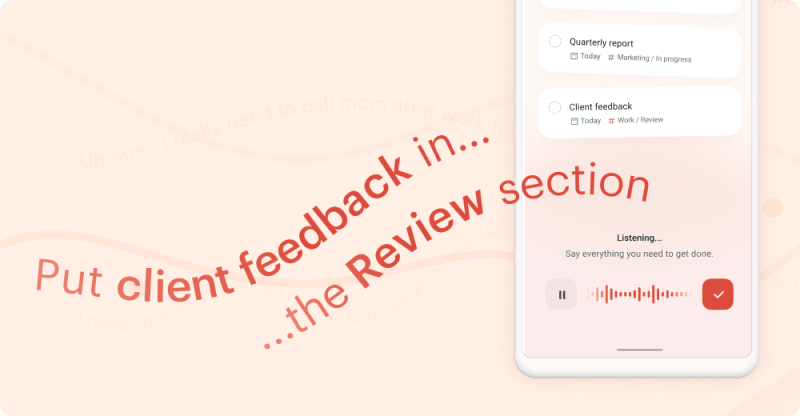
Ramble supports sections now, so you can say “Add quarterly report to the In Progress section” or “Put that movie in the Thriller section of my Watch List project” and tasks land exactly there.
It also picks up context from wherever you start. Open Ramble from the Today view, and tasks automatically get scheduled for today. Start from a label view, and they inherit the label. One less thing to specify. 🙌
Web, macOS, Windows, Linux
- ⚙️ Seva ensured scrollbars on Windows now have a consistent color, making them easier to interact with, especially in the dark theme.
- 🐛 Seva restored the tray icon on Linux after it disappeared in the latest release.
- 🐛 Thanks to Ricardo, your account name updates stick right away - no more waiting or wondering if the change took.
- 🐛 Frankie made sure the
Shift + Rkeyboard shortcut now properly opens the assignee picker when you've got multiple tasks selected.
🔢 Versions
Latest versions at the time of publishing: Web v9773; iOS 26.1.24; Android v12034; Android Wear w11989; Desktop 9.26.3
January 29, 2026
Web, macOS, Windows, Linux
- 🐛 Pedro A. fixed an issue in the task editor where labels containing numbers would not be recognized correctly when followed by dates.
- 🐛 Natalie fixed an issue where recurring tasks would disappear from the monthly calendar after scrolling past the week they were scheduled in. No more losing track of your future to-dos.
📧 Email forwarding is now on mobile
Inbox Zero, now from your phone. You can forward emails as tasks or comments directly from your mobile on both iOS and Android. Find the unique email address for any project or task in the three-dot menu to start sending emails straight to Todoist.
Conseil rapide
iOS
- ⭐️ Enric added two new swipe gesture options you can choose in Settings: None (to disable swipe gestures) and Reminders (to quickly add a reminder with a swipe). Learn more about changing your swipe actions.
- ⚙️ Swipe-to-select on iOS now uses two-finger swipe. We’ve switched to Apple’s native multi-select to make task selection more reliable. You can now select a task by swiping with two fingers. (Alternatives: long-press a task in list layout or tap Select in the three-dot menu.)
- 🐛 Witold swooped in to fix an issue where Todoist wasn’t respecting your custom date format from iOS settings when you used Quick Add. No more wrestling with the wrong dates!
- 🐛 Andris fixed a bug where the Inbox was mysteriously missing from the project suggestions when editing tasks.
- 🐛 Hiroki took care of an issue where tasks could be accidentally duplicated when adding them through Ramble. No more double-checking your to-do list!
Android
- ⭐ Prateek made task management even smoother by adding Reminders and None options to the handy task swipe actions.
- ⭐ Pedro S. made capturing tasks even faster by aligning Ramble’s default due dates with your active view. Starting a Ramble session from Today, a specific day in Upcoming, or a calendar time slot, now automatically applies that date to your new tasks (unless you specify otherwise).
- 🐛 Prateek fixed an issue where adding multiple tasks at once wasn’t working properly.
- 🐛 Pedro S. fixed an issue where Quick Add became unresponsive after restoring the app from the background.
- 🐛 Afzal fixed an issue where the widget would unexpectedly reset the scroll position on Samsung devices. No more frustrating jumps – your scrolling stays put.
🔢 Versions
Latest versions at the time of publishing: Web v9703; iOS 26.1.24; Android v12030; Android Wear w11985; Desktop 9.26.2
January 22, 2026
Ramble is live on all platforms 🚀
After thousands of brain dumps, meeting recaps, and “oh wait, I need to remember that” moments during the Beta, Ramble is now an official part of Todoist.
Ramble is the fastest way to get tasks out of your head and into Todoist; simply speak your mind and watch your swirling thoughts transform into structured tasks, complete with projects, dates, deadlines, and priorities.
Ready to turn thinking into doing? → Learn more
Web, macOS, Windows, Linux
- ⚙️ Scott improved scrollbar visibility in dark theme for Windows Chrome.
- 🐛 Frankie made it a cinch to drag tasks along the first day of the week in the calendar view, even on smaller screens.
- 🐛 Rui made some thoughtful tweaks to how mentions and links display in your activity log, so you can easily keep track of what’s going on.
- 🐛 Frankie sorted out a midnight mix-up where tasks scheduled for 11:59 PM were incorrectly showing up at 12:00 AM on your calendar.
- 🐛 Ricardo tackled a pesky bug that could reorder your overdue tasks when you were trying to keep them in your preferred manual sorting order.
- 🐛 Ricardo also fixed some task ordering issues, so you can now drag and drop tasks between sections, in and out of sub-tasks, or reorder within sub-tasks without any unexpected surprises.
iOS
🔔 New: Urgent reminders on iOS
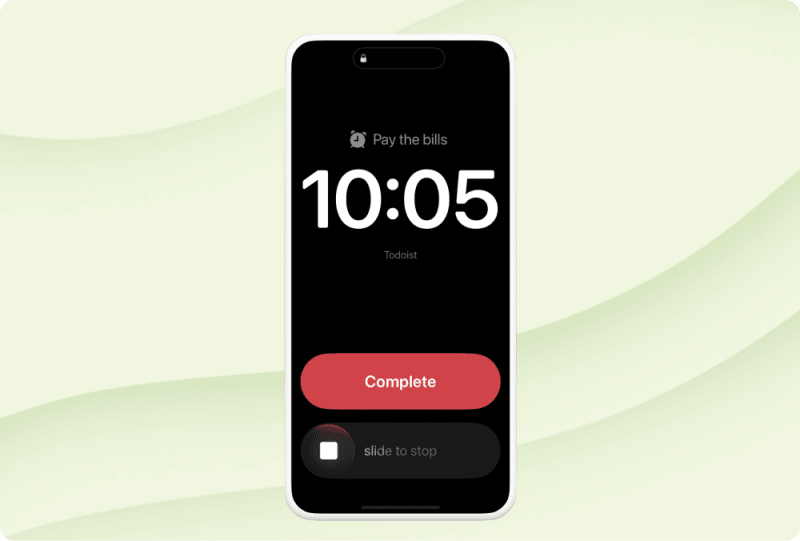
Thanks to Enric, we’ve just rolled out a first preview of Urgent Reminders on iOS! For those tasks you simply can’t miss, you can now toggle on “Urgent” to trigger a persistent, full-screen alarm that cuts through Silent and Do Not Disturb modes – and yes, it also rings on your Apple Watch!
You can even set one instantly in Quick Add by adding an exclamation mark to the reminders shortcut (e.g., “Pick up kids after work 5pm!10mb!”).
Note: This feature is currently a preview available only on the Todoist iOS app (v26.1.17).
→ Learn how to add an urgent reminder in our Help Center.
- 🐛 Andris updated the Add Task widget to ensure that it now reliably adds all tasks to your configured project section.
- 🐛 Witold fixed a crash that could happen when rescheduling multiple tasks at once. No more worrying about tasks disappearing when you’re trying to get organized.
- 🐛 Enric fixed an issue where URLs inside code snippets were being incorrectly parsed as clickable links.
- 🐛 Witold ensured that sub-tasks now correctly appear in projects using board layout, even when custom grouping by label or priority is applied.
- 🐛 Witold fixed a pesky repeat task display issue where “Every! month” would show up as “Every month on the 7th.”
- 🐛 Paul K. made sure newly-created workspace projects now display the expected layout when opened.
- 🐛 Paul K. also fixed an issue where new projects would show a customization indicator, even if you hadn’t actually customized the View options.
- 🐛 Enric fixed an issue where Todoist would keep pestering you to update your time zone, even after you’d already taken care of it.
- 🐛 Witold resolved an issue where educational tooltips in the navigation bar would obscure the very thing they were trying to point out on iOS 26+.
Android
- 🐛 Olga resolved a padding issue that previously made it difficult to tap edge buttons and other interactive elements on certain devices.
- 🐛 Pedro S. streamlined Quick Add by ensuring the Ramble button swaps for the submit button as soon as you start typing.
- 🐛 Rasto tackled a critical sync error that could previously undo your recent work.
- 🐛 Rasto also made sure Quick Add’s submit button remains consistently responsive.
- 🐛 Prateek addressed several board layout inconsistencies, ensuring sub-tasks now correctly appear when using custom grouping in projects, as well as in Today, label, and filter views.
- He also corrected a recurrence bug where tasks set for “co ndz” (short for “every Sunday” in Polish) were mistakenly showing on Mondays, and resolved an issue where custom recurrence end dates were off by a single day.
- 🐛 Also, Prateek worked hard to resolve a series of crashes occurring across the app and the Quick Actions widget, ensuring a much smoother and more reliable experience.
- 🐛 Prateek fixed an issue where the Dynamic Add button wasn’t properly adding new tasks to the top of the list.
- 🐛 And lastly, thanks to Prateek, you can once again edit task descriptions that contain a link.
🔢 Versions
Latest versions at the time of publishing: Web v9654; iOS 26.1.17; Android v12022; Android Wear w11977; Desktop 9.26.2
January 14, 2026
Web, macOS, Windows, Linux
- ⚙️ Francesca improved the Pro plan cancellation flow to redirect you directly to Stripe, making the process clearer and more straightforward when you need to manage your subscription.
- 🐛 Henning fixed smart deadline parsing for Norwegian, so “i morgen” and friends work as they should. Kjempebra!
- 🐛 Natalie fixed a quirky bug where you could set your name as “Todoist” or “Doist.” Now the name field actually expects, well, your actual name. 🙃
iOS
- 🐛 Erik rewrote the timezone dialog so it explains what’s changing instead of leaving you guessing.
- 🐛 Witold fixed a time zone issue that kept your goal celebration from showing all your completed tasks.
- 🐛 Andris fixed a bug where manually sorted tasks would lose their order when rescheduled.
- 🐛 Witold fixed a bug where the Share extension ignored your section choice and dumped tasks into the project root instead.
- 🐛 Andris fixed a crash that hit early adopters testing iOS 26.1 beta builds.
- 🐛 Hiroki polished up the comments design with some thoughtful refinements.
Android
- ⭐ Pedro S. added session start labels to Ramble’s tasks, giving you helpful context about when each thought session began.
- ⭐ Prateek added section selection to Ramble, so you can now capture tasks by voice directly into specific sections during your brain-dump sessions.
- 🐛 Prateek fixed an issue where checkboxes would overlap with the toolbar on foldable devices. Everything stays in its place now, exactly where it should be.
- 🐛 Pedro S. brought Android’s free Ramble session limit in line with web.
- 🐛 Olga fixed the filters lock dialog so it actually looks good in dark mode.
- 🐛 Olga fixed the scheduler so it’s no longer comically tiny when you turn your phone sideways. 🧐
- 🐛 Rasto fixed that annoying quirk where swiping back on Quick Add would dismiss your keyboard but leave the window hanging there awkwardly.
- 🐛 Kris fixed an issue where highlighting text across multiple lines didn’t work properly.
🔢 Versions
Latest versions at the time of publishing: Web v9583; iOS 26.1.6; Android v12012; Android Wear w11967; Desktop 9.26.2
January 07, 2026
Web, macOS, Windows, Linux
- ⚙️ Ben moved the multi-select toolbar to the bottom of your screen, where it’s easier to reach and won’t block your view of tasks.
- 🐛 Rui fixed an issue where the insights sidebar would show up when printing your project view.
- 🐛 Natalie fixed an issue where rescheduled tasks wouldn’t always highlight in their new spot.
Android
- ⚙️ Olga added helpful tooltips to team filters, so you can hover and understand exactly what each filter does before you click.
- 🐛 Kris fixed the calculations for deadlines, so “3 days after date” and similar shortcuts now work the way they should.
- 🐛 Kris fixed the overdue bottom sheet in calendar view so long labels no longer cause a formatting mess.
- 🐛 Kris fixed the “Add project” context menu so it appears where it should, not floating off into the void.
- 🐛 Kris fixed an issue where Quick Add would forget its state, so the Ramble vs Submit button choice sticks like it should.
- 🐛 Kris fixed a crash that could happen when searching with a missing project.
- 🐛 Kris fixed a bug where dragging and dropping board items could create duplicates.
- 🐛 Kris caught a quirky bug that occasionally showed “reset 0 sub-tasks” in your activity log when completing recurring tasks.
- 🐛 Prateek fixed a clipping issue in board view where your last task and the Add Task button were getting awkwardly cut off.
- 🐛 Kris fixed a crash that could happen when searching for tasks in projects that no longer exist. Your search results should load without drama now.
🔢 Versions
Latest versions at the time of publishing: Web v9539; iOS 26.1.0; Android v12004; Android Wear w11959; Desktop 9.26.1