
Todoist ist das weltweit beste Aufgabenmanagement-Tool für einen perfekt organisierten Arbeits- und Lebensalltag. Ich möchte mehr wissen
When I bring up Ernest Hemingway, you might think of his acclaimed novels, such as For Whom the Bell Tolls or A Farewell to Arms. Or, maybe you know of his escapades in the literary world during and after the Second World War.
But, on top of the legacy he left behind in literature and its social circles, he also surprisingly imparted a productivity tip that can help you maintain momentum between your work sessions.
This tip, known as the Hemingway bridge, served him so well that he recommended it to others throughout his adult life. With this technique, he always knew what was next going into his daily work, and perhaps it can give you a helpful kickstart as well.
In this guide, I’ll explain what the Hemingway bridge is, how you can apply it to your work, and how you can make it a habit.
What is the Hemingway bridge?
The Hemingway bridge is the practice of leaving a step unfinished when you end a work session that entices you to resume during your next session.
In famous media such as Esquire and the Paris Review, Hemingway’s go-to writing tip was to stop when you still have some momentum and pick up that thread the next day. I like the way he put it in the Paris Review:
“You write until you come to a place where you still have your juice and know what will happen next and you stop and try to live through until the next day when you hit it again.”
You still have your “juice” (the motivation that keeps you going to get your project done) instead of finishing your task and ending that motivational streak. So, how do you use this advice in today’s workplace?
A modern Hemingway bridge happens in these three steps:
Stop your work when you have an unfinished step left to complete. This could be anything from a paragraph to a to-do list item.
Leave a note to your future self. Record what you have to do next. Just a quick sentence will do.
Flag how to pick up that thread tomorrow. Add any additional thoughts to your note on what you need to know to start up again. Then, leave that note in a place that’s easy to access during your next work session.
Why the Hemingway bridge works
Besides Hemingway’s anecdotal evidence that this technique works, productivity research and psychological theory back it up.
In 2018, Japanese researchers tried to quantify what they called the “Hemingway effect,” based on the Hemingway bridge. They found that when they interrupted students in the middle of a writing task, students who had less remaining text to complete had much higher motivation to return to it. They found that two factors led to the “juice” that Hemingway spoke of in the Paris Review: being close to finishing a task and understanding how much work is left to complete the task.
This study ties into the Zeigarnik effect, where Russian psychologist Bluma Zeigarnik observed that we’re more likely to remember unfinished tasks than unfinished ones. The Zeigarnik effect can lead to us having a nagging feeling after leaving a task unfinished. On the flipside, we can use this phenomenon to our benefit by leaving a note for later and turning those thoughts into momentum for tomorrow.
Thanks to the two above factors, setting aside a final step for your next work session gives you the desire to finish it when you return. You can then lean into this feeling when you start work so you feel motivated right away.
From my own experience, some of my greatest problem-solving happens when I’m away from my desk. I know this happens to other professionals as well. There’s something about subconsciously processing a task outside of work that helps me return to it with a new outlook. Maybe you can relate!
4 Ways to apply the Hemingway bridge (with real-world examples)
I gave you a brief rundown of how to apply the Hemingway bridge, but perhaps you could use an example that’s relevant to your work. Even though the Hemingway bridge began with writing, it can help you in any work context. Here are four ways that could happen.
1. In writing
Break up sections, paragraphs, sentences, etc. Henneke Duistermaat from Enchanting Marketing creates Hemingway bridges by writing a blog post over a few days. Sometimes she’ll end at a conclusion paragraph, or other times, she’ll stop with an editing task remaining.
2. In project work
Leave a note or next action. Attorney David Weisselberger from Erase the Case will make a note about the next step he needs to complete for a case he’s working on. David says:
“It can be as simple as leaving a note that I stopped reading the sworn statement at paragraph number four or as a reminder to get the documents needed from the courthouse in Miami.”
3. In design
Set aside a creative task for next time. Adam Gorham from Adam Gorham Films saves on warm-up time by leaving a small task to start the next day. Adam says:
“This could include putting a marker on a music cue or leaving a portion of a sequence set up so my mind has already determined where I am going next.”
4. In collaboration
Hand off with clarity. Leave an easy-to-find note in your shared communication channel. Channels that already have good organization will set you up for success, such as Todoist’s shared collaborative channels.
Building a Hemingway bridge habit with Todoist
Todoist offers a variety of methods for prioritizing and labeling tasks that can help you design a Hemingway bridge that works for your workflow. Let’s look at a few ways to flag a task for tomorrow using its features.
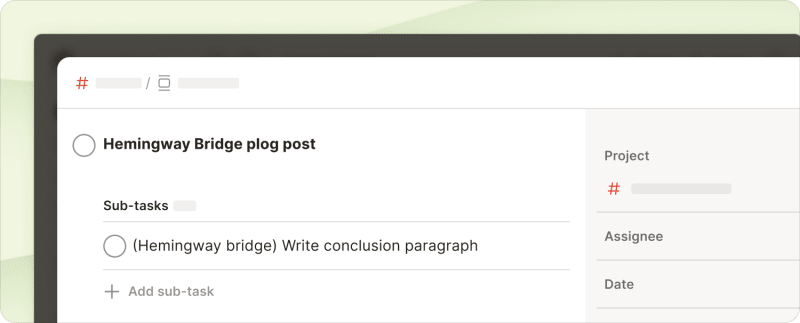
Leave your Hemingway bridge note in a task’s comments or subtasks. When you finish working on a big task for the day, create a subtask to pick up on tomorrow. Or, put a note in the comments on what you want to work on next.
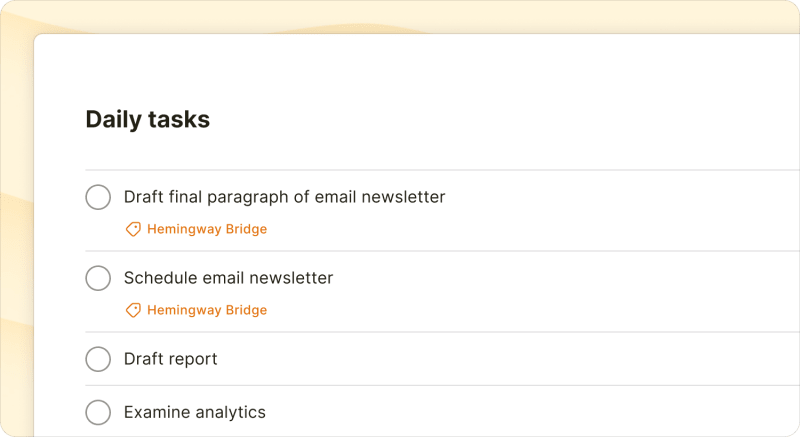
Create a “next up” view using labels and filters. If the nature of your work has you noting multiple steps in your Hemingway bridge, labels and filters can give you more clarity. Give your bridge tasks a special label, then create a project filter to show just the tasks with that label when you start your work session.
Use priority labeling to mark your Hemingway bridge tasks as P1. Todoist’s built-in priority flags also work with either of the above tips. Mark your Hemingway bridge tasks as Priority 1 using the red flag icon for easy visibility at the start of your next work session.
Set a reminder for your Hemingway bridge task that goes off at the start of your next work session. Add a reminder to your task or subtask that creates a notification at the beginning of your workday. You can then start your work session right after the notification takes you to your Todoist task and its notes.
More tips for sticking with your Hemingway bridge
You can also build mini-habits within your Hemingway bridge habit that help you keep it up every day. Try one of these strategies:
Always understand your scope of work
The “Hemingway effect” study showed that the effect comes into play with structured work where you know the time and effort needed to complete your Hemingway bridge task. So, for your Hemingway bridge to motivate you, it helps to have a clear understanding of the scope of your work. Break down each step in your projects and the time it takes with a project management tool like Todoist.
Finish every work session with bridge building
Set aside 60 seconds at the end of every work session to build your Hemingway bridge. Take that time to identify the task you want to start your next session with and write down the details you need for a seamless start. If you switch gears often and don’t know when you’ll pick the project up next, you might want to set aside two minutes to note more details.
Use recurring tasks as reminders for your Hemingway bridge
You can use recurring tasks to keep your Hemingway bridge tasks constantly in play. Edit this task every session to reflect your current bridge task, or use it as a reminder for your prep work.
Combine your favorite productivity method with your bridge
If you already have a favorite productivity tactic that you aren’t sure how to combine with your Hemingway bridge, get creative. The key here is to create a starting point for your next work session driven by the motivation to complete a leftover task. Your go-to productivity method can still form the foundation.
For instance, time blocking fans can leave a task unfinished to start the next similarly themed block. Meanwhile, if you eat the frog at the start of your day, you can make your Hemingway bridge task something important or difficult to combine the psychological boosts from both methods.
When Hemingway talked to The Paris Review about his writing workflow, he vividly described the feelings that came with what we now call the Hemingway Bridge:
“Nothing can hurt you, nothing can happen, nothing means anything until the next day when you do it again. It is the wait until the next day that is hard to get through.”
While you might not feel an endless yearning for the spreadsheet cells you left behind yesterday, the Hemingway bridge is meant to give you a spark of motivation for your next work session. Experiment with this technique to see how it can make you feel motivated to start the day rather than intimidated.
Give it a shot today by finishing today right when you have a little “juice” left. Leave yourself a bridge for tomorrow and see how it makes you feel.

Melissa King
Melissa King is a freelance content marketer for B2B SaaS companies in marketing, automation, and other industries that help people do their best work.