Nota
This page is updated in English only. Join our testing community to test early versions of the features below before anyone else (available in 19 languages).
What’s the catch? Just share your feedback so we can keep improving!
Quick Add has a new look. The new layout is cleaner and more focused, so you can capture tasks at the speed they pop into your head. Nothing you rely on has changed: same natural language input, same personalization options, same speed. And task details are now easier to reach when you need them with new shortcuts and simpler navigation, while staying out of the way when you don’t. It’s also easier than ever to move between Quick Add, Ramble, and capturing tasks from text and files.
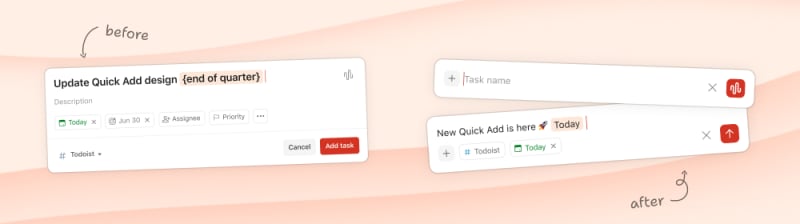
The biggest changes at a glance:
- Minimal empty state – Quick Add opens clean. Task actions appear after you start typing, so your focus stays on the task at hand.
- Better defaults – Every task is best with a project and date, so they’re shown by default. You can customize what’s shown at any time.
- Project action is now inline – Project has been brought together with all your other task dates and details.
- Description is a tap away – Not every task needs extra lengthy details, and when it does, description is a click or tap away via the
menu or
↓key.
Nota
New keyboard shortcuts
The new design adds three new keyboard shortcuts:
| Shortcut | What it does |
|---|---|
↓ | Opens and jumps to the Description field |
Shift + ↓ | Expands the More Actions menu |
{ | Opens the new Deadline picker |
All your existing natural language dates and keyboard shortcuts (# for project, @ for label, ! for reminder) work exactly as before.
Coming Soon
- Enjoy the new Quick Add experience when adding tasks inline on the web app.
- Customize Quick Add to show the task description by default.
Share your feedback
This feature is available to Experimentalists on all platforms. If you run into anything unexpected or have ideas to share, report bugs in our Experimentalist support channel – that’s exactly what we need to know.