Nota
This page is updated in English only. Join our testing community to test early versions of the features below before anyone else (available in 19 languages).
What’s the catch? Just share your feedback so we can keep improving!
When you walk out of a meeting with notes scribbled everywhere, or snap a quick photo of a whiteboard before it gets erased, turning all that into actual tasks usually means sitting down later to type everything out manually. Not anymore.
We’ve added two new ways to capture tasks in Quick Add: drop in raw notes or upload images, and Todoist will extract structured tasks for you – pulling out due dates, priorities, and more.
Here’s Samuel with a quick demo:

How it works
- Open Quick Add.
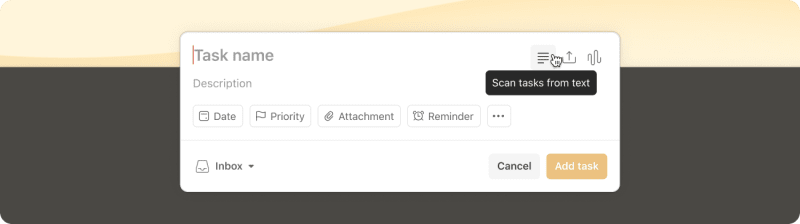
- Click the new text or image icon (next to the Ramble icon).
- Paste your notes or upload a photo.
- Todoist will scan the content and show you a preview of the tasks it found.
Note: The steps to access Task capture have changed. For the latest instructions, head to our help center article.
Consiglio rapido
Start testing
This experiment is available now to paid Experimentalists on web and desktop (v9747+). Mobile support is coming once we’ve refined the experience based on your feedback.
To access, make sure you have experimental features turned on in your settings. Then look for the new icons in Quick Add.
A few things to know:
- Text input: Paste plain text, formatted text, or even content from other apps. Works best with bullet points or numbered lists.
- Images: Upload JPEG, PNG, or WebP files up to 7MB and 4000x4000px. Photos of typed text or clear handwriting work best.
- What gets extracted: Task names, description, dates and time, deadlines, durations, priority levels, labels, assignees, projects, and sections.
Check out our help center article for specifics on which task attributes are supported (and which aren’t … yet!). We’ll keep it updated as we refine these experiments.
Nota
Share your feedback
Try dropping in your meeting notes, those grocery lists your partner scribbled on a napkin, or that stack of sticky notes threatening to take over your desk. Does it work the way you’d expect? Did it miss anything important?
Share your thoughts via the feedback link in the app. And if something’s not working right, report bugs in our Experimentalist support channel – that’s exactly what we need to know.