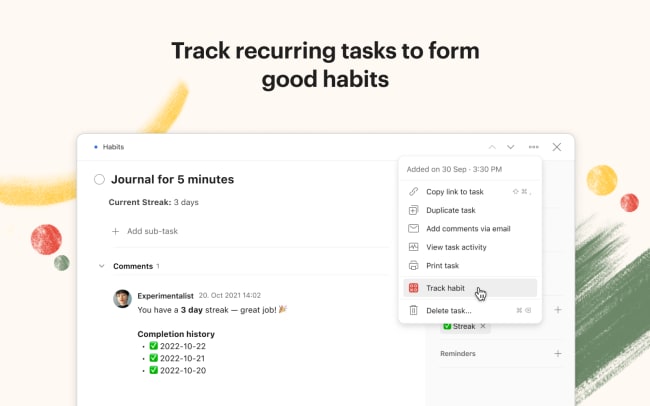
With Habit Tracker, you can track your recurring tasks in Todoist to build and maintain good habits.
One of the most powerful ways to build new habits is to track them. Habit Tracker helps you keep track of your habits by recording your habit streaks. Add the extension to your recurring task to track your task’s completion streak (in the task description) and completion history (in the comments). To start tracking a habit, select Track habit from a task’s menu.
Don’t break the chain by completing your recurring tasks every day (or hour or week)! Keep the streak alive and become successful in forming new habits.
To change settings, click on your avatar in the top-left corner, go to Settings, and select Integrations. Click Habit Tracker and go to the Settings tab to change the settings for this extension.
Note: Habit Tracker will display your current streak in the task description and override any text you have added to the description field. Therefore, be sure to leave the task description empty when you’ve added Habit Tracker to your task.
기능
-
좋은 습관을 형성할 수 있는 반복 작업을 만들어보세요.
-
작업을 꾸준히 완료하며 습관 스트리크를 유지하세요.
-
집중력을 잃지 않고 동기를 유지하며 습관을 지속하세요.