
How to Keep Projects on Track with Less Meetings
Spend less time in meetings and more time getting important work done. Get practical tips to reduce meetings while keeping projects moving forward.

Meetings take up a staggering amount of time.
The average employee spends 11.3 hours per week in meetings, which amounts to over a quarter of the average workweek. For managers, that number jumps to 13 hours per week. That equals over 80 workdays per year just sitting in meetings.
But time isn't the only thing meetings cost. There's the productivity hit, too.
So, when the heck do you find time to do your actual work?
Meetings are a major contributor to lost time, causing you to be busy rather than productive. When your day is interrupted by standups, 1:1s, and project check-ins, your ability to focus suffers.
But the biggest problem? All that time spent in meetings doesn't necessarily create more clarity.
Then there's the clarity problem. According to Atlassian, without clear action items. Without next steps or an understanding of who owns each task, you often need more meetings to get aligned. Meetings breed more meetings.
What Teams Really Need to Keep Projects on Track
Meetings tend to be the default solution for keeping projects on track. But they're not necessarily a good solution. Many are vague status updates that just rehash what you've already discussed.
Instead of more unnecessary meetings, here's what teams really need to move work forward:
Clarity about what's happening, what's next, and what's blocking progress
Decision-making to help unblock team members who are stuck
Ownership that makes it crystal clear who's responsible for what, so tasks don't fall through the cracks
Visibility into progress without having to schedule more check-ins
6 Lightweight Alternatives to Status Meetings
Eliminating unproductive meetings isn't as difficult as you might think. Here are six practical ways to reduce meetings and replace them with simpler options.
1. Weekly Async Check-ins
Save your team 30 minutes each week by replacing that recurring status meeting with a weekly async update. Here's a simple template with three questions:
What did you complete this week?
What are you working on next?
Where are you stuck?
Katy Flatt, Fractional COO & Problem Solver, uses this approach:
"I like to weave in async standup check-ins at least weekly with a lot of my teams. Just a quick prompt that says: what are you working on, what do you need help with, and an icebreaker. Doing this at the head of the week can do a lot to cut meetings later on and still keep everyone feeling connected."
These updates take just a few minutes to complete. And unlike attending a meeting, your team can respond on their own schedule.
2. Clear Task Assignments and Due Dates
Make sure everyone can see who's responsible for projects and when each task will be done without having to bring it up at your weekly standup. Create clear task assignments and deadlines in your project management tool.
For example, in Todoist, each task can have an assignee and a due date. You can add a description to clarify exactly what needs to happen, attach relevant files, or drop in links to related docs.
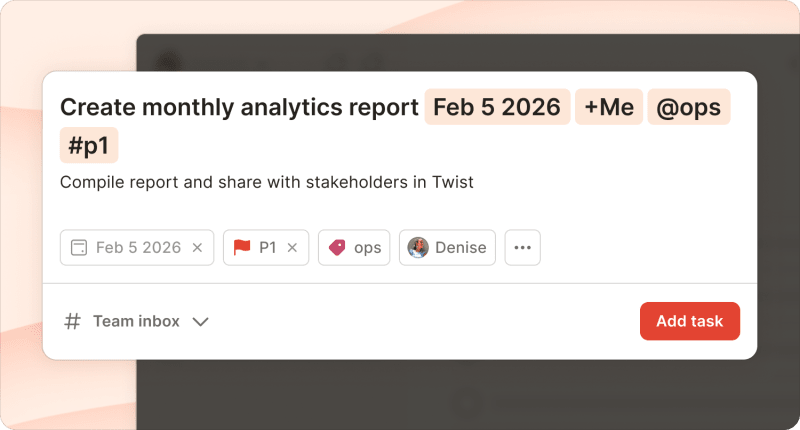
And for bigger tasks, use sub-tasks. They let you break the work into smaller pieces, each with its own assignee and due date.
3. Daily Recaps or Snippets
For fast-moving projects, a weekly check-in might not be enough. But that doesn't mean you need regular syncs.
Instead, have your team do a daily recap. At the end of each day, ask team members drop a quick note in a shared channel or project:
What they finished today
What they're working on tomorrow
Any blockers they need help overcoming
These don't have to be long. A few bullet points is enough. The goal is to create a lightweight way for people to stay informed (and jump in to help) without interrupting each other.
4. Public Project Boards and Dashboards
Rather than calling a weekly meeting to ask for a project update, set up views that everyone can check anytime.
In Todoist, this might look like a project in board view with sections for each major phase. For example, if you're launching a new feature, your project might have sections like:
Research & Planning: User interviews, competitive analysis, requirements doc
Design: Wireframes, mockups, design review
Development: Front-end build, back-end integration, QA testing
Launch: Marketing materials, documentation, go-live checklist

Each task gets an owner, a due date, and a place for comments and attachments. Anyone can open the project and see exactly where things stand, with no need to schedule a check-in to ask about progress.
5. Quick 1:1 Messages or Voice Notes
Sometimes you just need to talk something through. But that doesn't mean scheduling a 30-minute meeting three days from now.
When someone's stuck or needs quick feedback, video feedback (like a Loom) or an async voice note can solve the problem immediately.
Caitlyn Kawaguchi, Co-Founder & COO at , uses this method:
"When giving feedback, especially around marketing materials for campaigns, I switched to using Loom for async review instead of having an additional check-in or review meeting."
"Video screenshares were the best way I found to give feedback, especially on visuals, but those extra meetings added up, especially with multiple review cycles.Loom has been a great way to get the same level of results from feedback rounds without the meeting itself."
6. Shared Goals and Milestone Tracking
When you need a big-picture view of team projects, use shared goals and milestone tracking.
Todoist's Project Insights shows whether a project is on track based on how work is progressing. At a glance, you can see the project health, the number of completed tasks, and what's at risk.

You can set up milestones as high-priority tasks or as sections. As your team completes tasks and hits deadlines, Project Insights updates automatically. And when something needs attention, you can easily find it in the list of at-risk tasks.
Tools That Support Productivity Without Meetings
You don't need a complicated tech stack to reduce meetings. A few well-chosen tools can do most of the heavy lifting.
Todoist

Todoist keeps everyone on the same page with shared projects and team workspaces. Task assignments and due dates create clear ownership. And task comments keep all the context in one place, so you're not hunting through email threads.
Twist
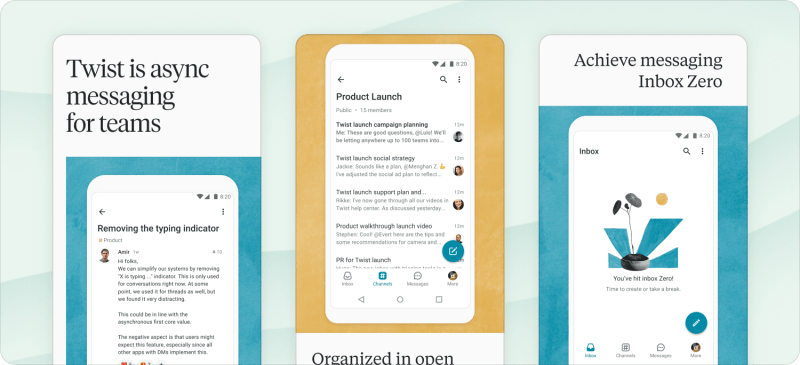
Also made by Todoist,Twist makes async communication easy. Twist is organized by threads, so conversations have a clear topic, and responses don't need to be instant. Thisproductivity app is designed for teams that want to reduce interruptions without losing connection.
Zight

Zight makes visual communication easy. Instead of scheduling a meeting to walk someone through something, Zight lets you record your screen, add annotations, and share. Team members can watch and respond on their own time, keeping work moving forward.
Notion

Notion works as a team wiki. It's great for storing onboarding docs, project briefs, and shared knowledge in one searchable place. Plus, it helps team members find answers without scheduling a meeting to ask.
As Katy puts it:
"Creating a self-serve knowledge base is the only way to go. I prioritize relentless documentation that's organized in a clear and searchable way. This not only helps people find the answers to their questions, but also empowers contractors to feel included in the day-to-day changes of any company without sitting through weekly, monthly, or quarterly updates."
How to Reduce the Number of Meetings for Your Team
Ready to cut down on meetings? Making a major change may require a company culture shift. But you can start to use these methods as a trial with your direct team.
Identify Critical Meetings to Keep
Not all meetings are unnecessary. Some are essential. You'll likely want to keep meetings for:
Brainstorming and ideation: When you need real-time creativity and energy
Complex decisions: When you need to talk through multiple perspectives
Difficult conversations: When you need face time for performance feedback, conflict resolution, or other sensitive topics
Team building: When you need to maintain a strong connection, especially for remote teams
For all other meetings, consider whether they're truly needed to move projects forward. A simple way to confirm whether you need a particular meeting is to check the agenda.
Editor and Content Strategist Isla McKetta did this during her time at Ookla:
"We forced having agendas for meetings. I love to start a meeting with a good chat because it's humanizing. But there should be something on the agenda if you're going to gather people for work."
If someone sends you a meeting invite, don’t be afraid to respond with “Where can I find the agenda?” This gently prompts others to consider the necessity of the meeting.
And just because a meeting makes it onto your calendar doesn't mean it actually needs to take place. Let team members cancel meetings if they're not truly necessary.
Stephanie Yoder, Director of Content, has used this approach while leading teams:
"I'd check in before 1:1s to see if there was anything we actually needed to discuss. If not, I'd invite my direct reports to cancel. But I tried not to cancel more than two 1:1s in a row because face time is important for relationship building, especially on remote teams."
Block Out Focus Time
Decide on meeting-free times or days for your team. This reduces interruptions and gives everyone time to focus.
In addition to designating Fridays as no-meeting days, Stephanie says she "encouraged people to pick several mornings or afternoons a week and completely block them on their calendar as deep work time."
When you let your team control their calendars, they can prioritize the times when they do their best work. This can help improve productivity and give everyone space to do better work.
Replace One Recurring Meeting
Don't try to overhaul everything at once. Choose one recurring meeting (like your weekly project status call) and replace it with an async alternative for a month. Set up a system (like a task management tool or team communication app) and get everyone on board.
Stephanie Reese, Fractional COO, used this framework to cut meeting time in half at bookingkit: "Have a weekly meeting? Move it to every other week. Have a bi-weekly meeting? Move it to once a month."
"Immediately, we saw a huge reduction in meetings. Especially with leaders, who were in meetings back to back and almost had no time to do the work they were talking about, there was an immediate sigh of relief."
Review Meeting Attendees
When you rethink your meeting schedule, reconsider who's invited. Chances are, not everyone needs to be there. Each person you remove from the meeting invite gets 30 minutes back in their day.
Isla shares that at Ookla:
"We combed the calendar for recurring meetings and canceled, consolidated, and interrogated every one to see if all the people who were in that meeting needed to be."
Set Expectations for Async Check-Ins
Don't assume your team will fall right into the rhythm of using async check-ins, especially if they're accustomed to status meetings. Instead, explain your workflow. For example:
"We're using Todoist for all project updates. Check the project and the individual task before asking for status updates. Drop your weekly recap in the Twist #updates channel by Friday at 3 p.m."
The clearer your expectations are, the better your system will work with fewer meetings.
Pilot Your Plan and Gather Feedback
Give your new meeting schedule a month. Then, ask your team for qualitative feedback:
What's working? What's not working?
What do you miss about the meeting? What do you not miss?
Gather quantitative data, too. Check project timelines and milestones. Have you missed any major due dates? Or are team members completing work faster than before?
Adjust your plan based on what you learn. For example, maybe a monthly sync is a great replacement for weekly meetings. Maybe your async check-in template needs tweaking to get team members to share more valuable information.
Or maybe you've canceled too many meetings, and some are more necessary than you thought.
Jaclyn Mahoney, Executive Director of Product, shares: "I was militant about canceling meetings where the purpose was to give updates. What ended up happening was that 1:1s got bloated with all of the things my directs wanted to pass by me."
"So, I shifted my approach: I shortened 1:1s to 25 minutes and gave that time totally to my directs," she explains. "Then I started scheduling separate 25- or 55-minute meetings when there was something specific to discuss, with one condition: Whoever was leading the meeting needed to have at least two substantive questions for feedback ('Any questions?' doesn't count)."
"It's probably more meetings overall, but less time in meetings. And time in pointless meetings has gone way down," Jaclyn says. "Turns out, meetings are important. But meetings that suck are a drain on time and talent."
Common Concerns and How to Address Them
When you rethink team meetings, you might get some pushback. Here's what to expect and how to handle it.
"We'll miss personal connection."
This is a valid concern, as meetings aren't just about work. They're also opportunities for team bonding.
Solution: Keep team-building meetings and 1:1s. Cut the status updates and quick sync calls that don't require face time. Add a human element to async updates to maintain employee engagement and help team members keep up relationships.
"What if someone is stuck and doesn't say anything?"
This is a legitimate concern that even meetings can't solve. Struggling team members often stay quiet in meetings.
Solution: Rely on the assignees and deadlines you’ve set to create accountability for tasks and projects. Communicate clear escalation paths, making it easy to ask for help through weekly updates, async messages, or quick video calls.
"How do I know people are working?"
If you need meetings to confirm your team is working, the issue is less about meetings and more about trust.
Solution: Focus on outcomes and delivery. Check project analytics. Are tasks getting done? Is work moving forward? These are much better indicators than how many meetings someone attends.
Remember: The goal isn't zero meetings. It's more intentional meetings.
Everything else? Replace it with a system that keeps work visible, ownership clear, and momentum steady.
You'll likely find that when teams have clarity on what's happening, who's doing what, and where to find answers, they don't need as many meetings to stay aligned. And when you do meet, it's because there's a real reason: a decision to make, a problem to solve, or a relationship to build.
That's the shift: from meetings as the default to meetings as a tool you choose deliberately. And that frees up time for the work that actually makes an impact.

Anna Sonnenberg
Anna Sonnenberg is a writer, editor, and strategist with over a decade of experience creating content for B2B SaaS companies like Agorapulse, Komodo, and Relato. As a seasoned freelancer managing a dynamic client roster, she's always testing productivity and time management tactics.
