
5 Signs You're Ready to Move to a Todoist Team Workspace
Todoist Pro works great for individuals. But growing teams need more. See 5 signs you’ve outgrown Pro and what a Todoist team workspace changes.

Todoist Pro works great for solo task management and small team collaboration.
But as teams grow, have you noticed yourself spending more time working around the system than working in it?
This might be a sign that your team has outgrown the Pro plan. Here’s how to tell and what to do about it.
Why Pro works for you (but not your team)
Pro excels at keeping a person organized across all aspects of their life.
At work, solo users stay focused. Rambleand Quick Add capture tasks quickly. Priority flags highlight what needs extra attention. And the subtasks, reminders, and recurring due dates keep things on track.
It works beyond the office as well. Pro manages grocery lists and medication reminders just as smoothly as client deadlines and project milestones.
Pro also works for casual collaboration, especially with one-off tasks like coordinating a potluck, managing a carpool schedule, or planning a group trip.
But, daily team coordination? That’s a different story. Pro’s features, built for solo workflows, sometimes require clunky workarounds to keep teams on the same page.
5 Signs you’ve outgrown Pro
Here are some common signals that your team might have stretched Pro as far as it goes.
1: You’re managing a bunch of your colleagues’ Pro accounts
Managing a team through individual Pro accounts creates unnecessary admin work.
If a team has five teammates on Todoist Pro, that means five separate subscriptions on five different credit cards. And five monthly reimbursements to process.
Plus, new team members need manual invites to each project.
2: You’ve become the bottleneck in your team’s workflow
When one person knows Todoist best, everyone comes to that person with questions. If you spend a good chunk of your day answering “Where is that file?” or “Did the client approve this?” instead of completing your own tasks, that person might be you. 😉
This creates a no-win situation. Answering others’ questions quickly can interrupt your own workflow. On the other hand, slower responses tend to frustrate teammates.
3: Zero visibility into team activity
Pro doesn’t provide a central place to see if someone moved a deadline, reassigned a task, or added a comment with client feedback.
“Who changed this?” and “When did this happen?” become regular questions without teamwide visibility.
What should be a simple update turns into a frustrating game of 20 Questions to figure out the current status of a project.
4: No standardized processes
Imagine this scenario: Your coworker who always handles the monthly newsletter is out with the flu. You’ve offered to cover the next newsletter. Their project shows tasks, but which ones happen first? Who needs to approve what? What’s the usual timeline?
Pro keeps templates personal, so teammates can’t learn how colleagues handle recurring work. With no shared templates or documented workflows, subs like you have to stumble through what is otherwise a standard procedure.
And if that sick coworker ever leaves the company, all their processes disappear with their Todoist account.
5: Your workspaces are a hot mess of personal, client, and team tasks
Pro doesn’t separate personal from team workspaces. When you share a project with a client, they see your whole workspace. If you have a grocery list on Pro, clients will see that alongside your pitch deck.
It also doesn’t hide private work tasks. Teammates invited to a project can see reminders for on-the-downlow tasks like “Complete PIP project” or “Speak to Marta about budget cuts.”
These five signs show teams working beyond the occasional collaboration that Pro was designed for.
Why a Todoist team workspace just works
The Todoist Business plan gives teams a dedicated workspace designed to align teams and keep projects on track. Here’s how Business addresses the “outgrowing pains” we’ve just discussed.
Centralized admin and billing
Instead of juggling five Pro subscriptions across five different credit cards, pay one bill for your whole team. Add or remove people from a single admin dashboard.

When a new colleague joins your team, they’re invited to the team workspace. From there, they can browse and join any project they need without asking for individual invites.
Transparent insight across your team
In Business, teams get a shared workspace to browse, preview, and join collaborative projects.

Sarah Carr, Director of Advancement at the Rhode Island Historical Society, saw the benefits of a shared workspace for her team.
“Before Todoist, we had a lot of ‘Did you get to that yet?’ conversations. Now, it’s a task. You comment, tag the person, and keep going. It’s clear and accountable.”
Team members find what they need on their own, without interrupting someone else’s work to ask for answers.
Easy team activity tracking
The Business activity log shows every shifted deadline, new assignee, or added comment. Teams can see who made changes and when they happened.
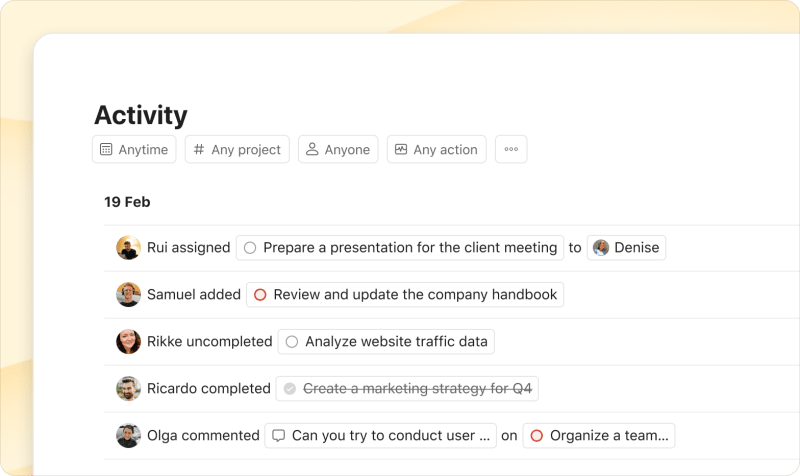
Project insights show completion trends and progress patterns over time, so teams know if a project’s moving or stalling before it becomes a problem.

Standardized workflows with templates
With Business shared templates, teams can use a consistent workflow for tasks like onboarding clients, completing monthly reports, or launching new features.
Now, process knowledge stays with the team rather than being tied to individual accounts.
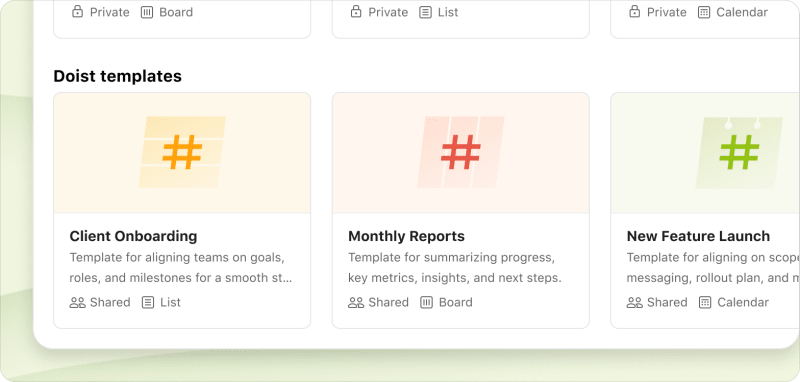
When someone’s out sick or leaves the company, their replacement can open the template and follow the same process.
Built-in privacy for personal and business workspaces
Everyone on Business gets Pro features for their personal workspace. Their personal workspace (“My Projects”) stays completely private, even when collaborating with the team.
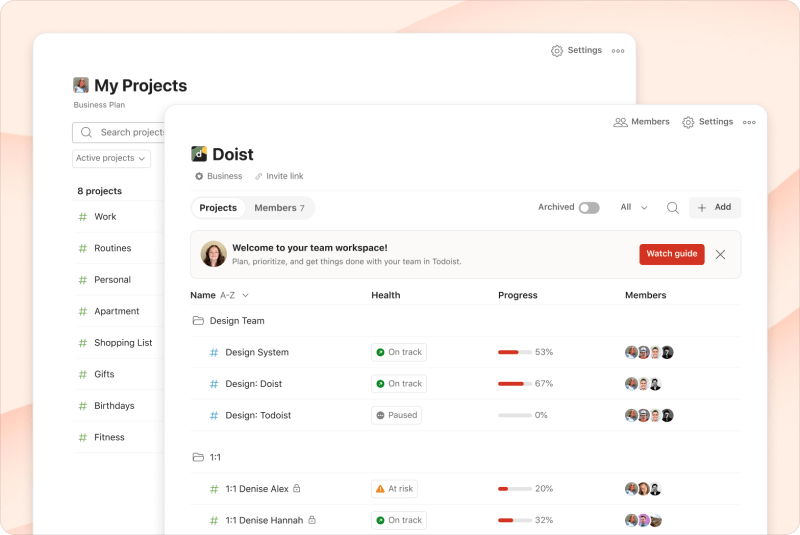
When you share a project with a client or invite a teammate, they only see that specific project. Your grocery list, dentist appointments, and work-sensitive tasks like “Prep for HR call” stay in your personal space.
For sensitive team workflows, create a restricted project that only invited team members can see in the team workspace.
When your team has a workspace built for collaboration, the coordination work that used to take up your day just fades into the background.
Business solves the coordination problems that Pro can’t handle. Your team gets centralized billing, shared visibility into what’s happening, and templates that stay with your team even when people leave.
Ready for a shared workspace built for teams? Add a team for free and test it with your next project.

Lisa Kalner Williams
Lisa Kalner Williams runs Sierra Tierra Marketing, a content and product marketing company trusted by B2B SaaS brands to build customer-obsessed content that drives conversions at all stages of the sales funnel.