Day One went well. Tasks got created, people showed up, and there’s real momentum in the room – you’ve earned the urge to step back and let it run.
Not quite yet, though.
The first two weeks after the kickoff are the most important for momentum. The champions who run a great Day One and then go quiet are the ones who come back in week three to a cold workspace, not because the team rejected Todoist, but because nobody was facilitating the new workflow.
So your job between now and Day 14 is small but specific: read the signals, and step in early enough that a quiet patch doesn’t become a point of failure.
These are three checkpoints to be mindful of:
Day 2 – the morning after kickoff
Before your first meeting (coffee in hand), open the workspace and check two things:
- Every team member has at least one task assigned to them.
- You’ve completed a task yourself so the team sees the loop close.
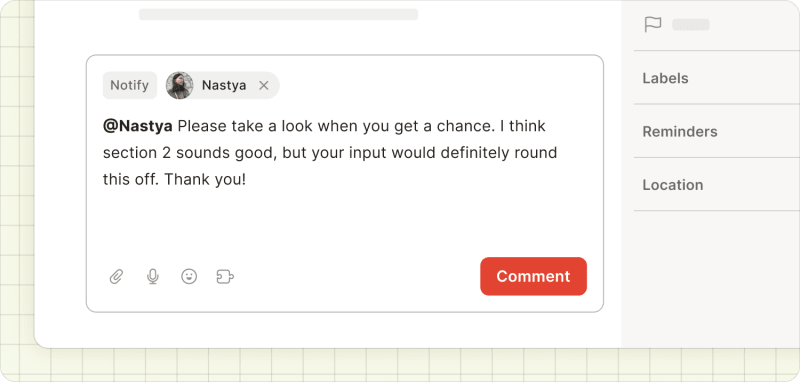
If you don’t see any activity by lunch time, @mention a teammate in the task comments to give them a small, specific nudge that doesn’t feel like a broadcast. If they don’t respond to that, try chat or email to get their attention.
Day 3 to 5
By midweek, Reporting tells you whether the workspace is being used by anyone other than you. You can filter it by project, person, event type, or date range. What you’re looking for:
- Tasks being created and updated by team members (not just you).
- Comments appearing on tasks.
- Tasks being completed by team members.
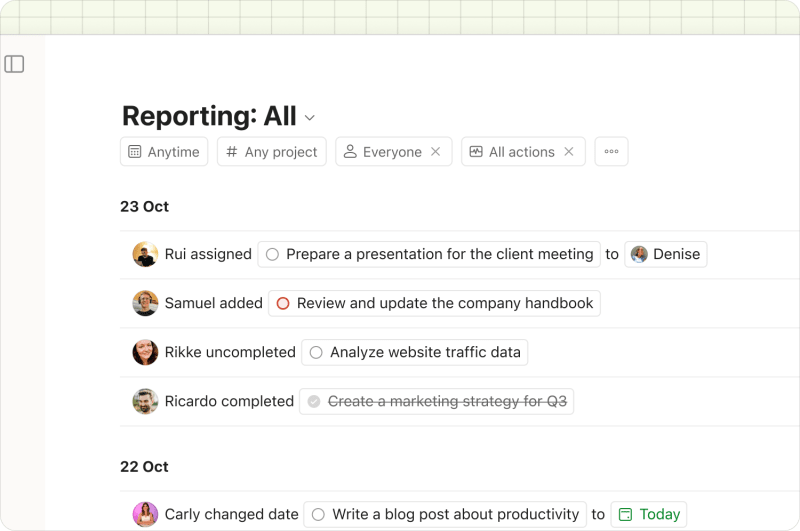
If only your activity is visible, the team is still seeing and treating Todoist as your tool and may be disengaging. That’s the moment to intervene, and what usually works is public, and more specific.
Try a message in the team channel. Something like:
빠른 팁
“Hey team, I noticed three tasks went overdue yesterday. If something’s blocked, pop a comment on the task so I can help unblock it.”
This also frames you as willing to help, and reminds everyone that it’s a shared space.
Day 14 – the two-week mark
By now, the workspace should look and feel alive without you driving every move. Here’s what a team that’s up and running looks like:
- Four or more projects with regular activity.
- Tasks being created, assigned, completed, and commented on by multiple people.
- Pending invitations resolved (everyone who was supposed to join has joined).
If any of these are missing at Day 14, keep your mind on what matters: you don’t have an adoption problem yet. It’s more about momentum – which is a smaller, more fixable thing. The next lesson will tell you exactly what to do about it.
Let’s go.