Todoist makes the world’s #1 task manager to organize your work and life. Tell me more
A colleague showed me her bookmarks folder last week. She had hundreds of saved articles, all carefully tagged by topic.
When I asked if she actually used the bookmarks in this folder, she laughed. "If I remember what they're about, I do."
I tried hard not to scratch my head and ask, “Why bother with saving and organizing if you never use these articles to learn something?”
That's the problem with most note-taking systems. We collect information but never relate to it.
The Zettelkasten method connects ideas instead of just collecting them. This guide shows you how it works and how to set up your own system to increase your knowledge about any topic.
What is the Zettelkasten method?
Zettelkasten is a note-taking system where you write one idea per note and connect it to other notes in your collection.
German sociologist Niklas Luhmann created this personal knowledge management system in the 1950s. His own Zettelkasten (“note box” in German), with an estimated 90,000 notes, helped him write 70 books and nearly 400 articles in his lifetime.
Luhmann didn't want his notes to sit unused or become impossible to find, so he created unique identifiers for each card to link one idea to another.
Each note had a unique identifier, like a timestamped 202601061140, which he'd write on related notes to create connections. One note might reference three notes, and those might reference five more. Soon, he had a web of interconnected knowledge.
Before the internet, Luhmann created his own network of linked ideas, with each note pointing to related thoughts.
Although Luhmann built his system for academic research, his solution for turning scattered information into connected knowledge can help busy professionals in any field.
And digital tools make the Zettelkasten method easier than Luhmann could have ever imagined.
Luckily, these days, you don’t have to create a manual note card system with connections in the millions. Digital tools now make this process a breeze. Let’s learn how.
How Zettelkasten helps overwhelmed professionals
Traditional note-taking gets messier as you capture more isolated documents. Your folders fill up with saved articles, meeting notes, and research reports that don’t connect.
Zettelkasten works differently. Instead of collecting notes that sit alone, you use this system to build a network of connected ideas. Each new note strengthens connections between the ones you’ve already made.
The more you add to your Zettelkasten, the easier it becomes to understand concepts and apply them to your work.
Here’s how this connected thinking helps you work smarter.
Think more clearly
Say you’re preparing a client pitch. You connect a note about their budget concerns from last week’s article to an article you read three months ago about value-based pricing.
Then, you link both these notes to a note you wrote yesterday about how your competitor’s pricing proposal structure.
With this linking system, you don’t have to start the pitch from scratch. You build on what you’ve already learned. You understand the client’s concerns more deeply and find patterns that someone learning about value-based pricing on its own would likely miss.

Capture once, reuse forever
If you’re a marketer (or work with one), you know the term “repurposing content.” That’s what Zettelkasten does with your ideas.
Most note-taking doesn’t work this way. Take this scenario: You know you wrote down an explanation for a new AI process. Somewhere.
You search through folders and messages, hoping you remember the right keyword to retrieve it. You try to guess what day you wrote down this explanation as you flip through your spiral notebook.
With Zettelkasten, ideas and insights are easily retrieved through linked notes or through a keyword search.
You’ll soon spend less time searching and more time putting insights into action.
Avoid professional TMI
Zettelkasten teaches you to be picky about the information you save. You only capture ideas worth remembering and linking to others in your collection.
If you’ve saved 25 ebooks to your Google Drive, why not pull out the most important ideas and capture them as linked notes? Then, delete the ebooks and clear up some space in your drive (and your mind).
Rinse and repeat with your folders and subfolders of bookmarked articles or saved LinkedIn posts.
You’ll end up with a focused collection of ideas that moves you forward instead of a pile of randomness that buries you.
The anatomy of a Zettelkasten
What does a good Zettelkasten note look like? And how do those connections actually form?
Let’s review the three types of Zettelkasten notes, how to write these notes, and how to add strategic links.
Types of notes
Zettelkasten uses three types of notes that develop your understanding in stages.
Fleeting notes are the first stage. They quickly capture thoughts on something you’ve read, watched, or listened to.
These notes are rough and brief, like what you might write in the margins of a book, in a podcast transcript, or in an ebook.
Literature notes dig deeper into specific sources.
After finishing an article or podcast, review your fleeting notes and write the key takeaways.
Add a citation so you can refer to the source later on.
Once you’re done with the fleeting notes, delete them. They’ve served their purpose.
Finally, permanent notes contain your interpretation of an idea.
These draw from several literature notes. Literature notes summarize what a source says. Permanent notes explain what you think about a topic and how it connects to other ideas in your Zettelkasten.
One idea per note
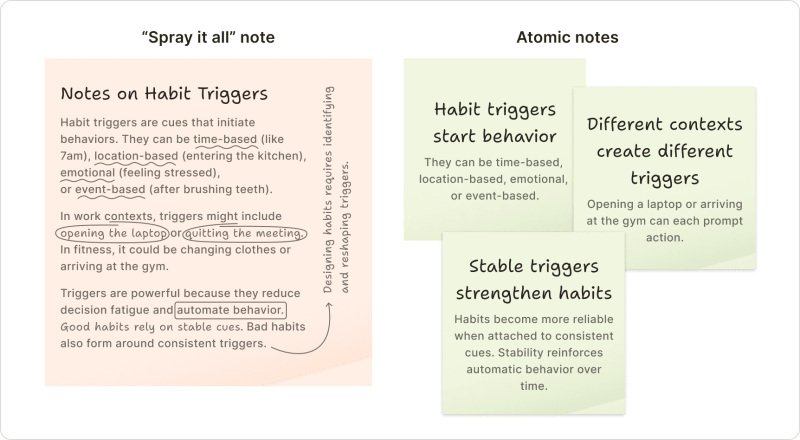
Each permanent note should contain a single, complete idea. This is called an atomic note.
Atomic notes promote clarity. Writing about one concept means you have to understand it fully.
This focus also makes notes reusable. If, say, you need to explain habit triggers in three contexts, you’ll have one card for each context. This saves you time by letting you find this information without scrolling through a more comprehensive note.
And six months later, your future self can open an atomic note and easily understand what it contains.
If you’ve recently taken notes on a book, webinar, or trade show session, organize the ideas you captured in a series of standalone atomic notes, with each note containing a different idea. Then, link related notes together.
Links that form insight networks
Links are what make the Zettelkasten method so powerful. This is how Luhmann made his analog World Wide Web.
Without links, you’re back to the traditional way of collecting (but not connecting) information.
When you create a permanent note, ask yourself: What other notes does this connect to?
These links create pathways through your thinking, much like how your brain connects related concepts.
Add those connections by linking the relevant notes.
To find related notes in tools like Obsidian, Notion, and Roam, use double brackets and start typing a keyword. For example, by typing "[[Productiv]]," you’ll find your notes on productivity. Select the one you want to link to, and the tool will insert the hyperlink with anchor text.
(In Notion, you can also type @ or + to find and add the note you want to link.)
Notes in your own words
Avoid the temptation to include verbatim quotes in your permanent notes. Zettelkasten works best when you write these notes in your own words.
Putting ideas in your own language helps you grasp their meaning. This will be especially helpful to your future self who will return to these notes.
Your wording also makes it easier to spot connections with other notes and explain this idea to others.
How to organize your Zettelkasten
You can set up a Zettelkasten in any tool that lets you capture quick thoughts and link notes together. Here's how to pick one.
Pick a tool that goes with your flow
The best tool for Zettelkasten is not the one that ranks highest on software review sites or Google.
The right tool is the one you’ll use regularly.
When trying out a tool, ask yourself: Can I start using it today? Will I remember how it works next week? Does it fit into my existing workflow, or is it super disruptive?
Stick with whatever tool feels right for you.
3 leading digital Zettelkasten tools
If you search for Zettelkasten tools, three names come up consistently: Obsidian, Roam Research, and Notion.
Obsidian stores your notes locally on your computer, so they’re easy to access whenever you’d like, even offline. Its graph view provides a visual of how your ideas connect. If you stick with Obsidian’s basic features, the learning curve is relatively easy. And it’s free for personal use.
Roam Research was built for networked thinking. Its automatic bidirectional links let each note connect to any other. The interface takes getting used to. Plans start at $15/month.
Notion has Zettelkasten templates to get started quickly. Some users love Notion's customization options, while others find them distracting. The free plan covers most personal Zettelkasten uses.
Todoist for Zettelkasten
Truth time. Todoist can’t duplicate what Obsidian, Roam, and Notion do for note-taking.
But what Todoist can do is keep your notes in those tools from being unprocessed and unused. Here’s how to use Todoist to make the most from your Zettelkasten in one of the note-taking apps we’ve talked about.
Set reminders to manage your Zettelkasten
Creating recurrent tasks to keep your notes in a “most-useful” state. For example, set weekly reminders to process new notes, monthly reminders to remove outdated material, and quarterly reminders to scan notes for new, unexpected connections.
Create action items from what you’ve learned
Todoist can help you act upon what you learn in your Zettelkasten.
When your linked notes reveal something worth exploring, add a task like: "Write that proposal about the bulk editing feature" or "Draft blog post on async standups." Link to the relevant notes so you can refer to them when you sit down to work.

Todoist's free plan works for most Zettelkasten workflows.
Zettelkasten at work: real-world examples
Zettelkasten can seem abstract until you see it in action. Let’s walk through three examples where professionals use the Zettelkasten method to fix something that wasn’t working.
Product manager: Maya synthesizes user research to influence roadmap
Problem: Maya cannot keep track of all of her company’s customer feedback. She has access to tons of useful customer insights, but they're all over the place: Her G2 portal, HubSpot, Gong, Slack, and her inbox.
She needs to factor customer feedback into her upcoming product roadmap, but because she’s overwhelmed by the scattered information, she tends to incorporate only the feedback she remembers.
How Zettelkasten helps: Maya starts by capturing feedback as fleeting notes.
Here, she captures quick thoughts like, “User interview: Sarah mentioned struggle with bulk editing” with a quick note about context.
She then sets up a weekly recurring task called “Process research notes into Zettelkasten” to remind her to turn those fleeting notes into literature notes.
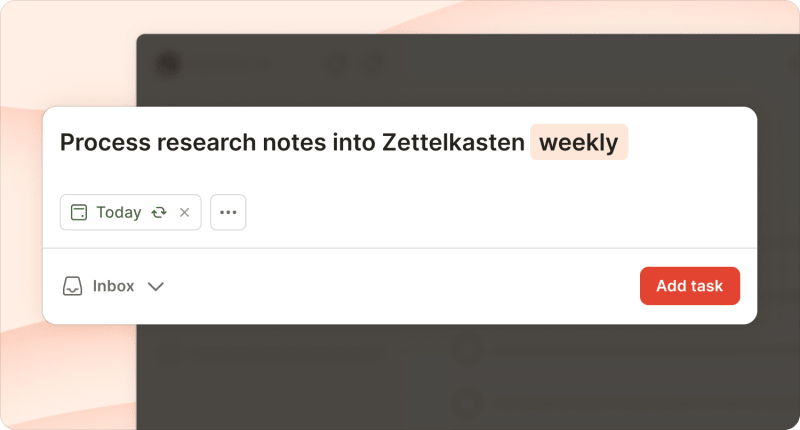
When she sits down to write the literature notes, she captures what users actually said. From her fleeting note on Sarah's interview, she writes:
Sarah (enterprise customer, 50-person team) said: “We have to update the same task across 20 projects manually. It takes forever and we make mistakes.” Context: During Q3 planning discussion, it was mentioned that this happens weekly.
Then Maya creates permanent notes that synthesize her interpretation:
Users need bulk actions when managing large datasets across multiple projects. Manual repetition creates errors and wastes time.
She links it to related permanent notes about performance concerns, workflow patterns, and feature requests.
When she spots connections among permanent notes about users struggling with the same workflow, she creates a new permanent note, “Bulk editing pain points,” that synthesizes the pattern and links to the individual notes.
Then she adds a task in her project management system: “Draft roadmap proposal: bulk editing feature” with a link to that permanent note.
Outcome: Maya takes pride in her product roadmap, knowing she has clear, connected arguments, backed by traceable, synthesized research for each decision she makes.
Content marketer: James builds a library of reusable ideas
Problem: James's content team keeps repeating themselves. They produce podcasts, blog posts, YouTube videos, and webinars, but the takeaways aren’t captured in a central location.
When his team creates a new piece of content, they might think, “Hm. Didn’t we cover that benefit someplace,?” but can't remember where. Instead of building on or repurposing existing material, his team wastes time and resources by repeating the same talking points.
How Zettelkasten helps: James captures interesting concepts as fleeting notes while reviewing his team's content.
Podcast ep 47: guest mentioned async standup approach
Blog post: case study on reducing meeting load.
He then schedules a recurring task: “Process content notes Fridays 3 p.m.” During these Friday afternoon sessions, he creates literature notes that capture the source material.
For the async standup fleeting note, he writes:
Guest: Maria Chen, Head of Product at B2BB2CCorp.
Quote: “We replaced daily standups with a shared doc everyone updates by 10 AM. Saves 5 hours per week per person.”
Episode 47, timestamp 18:30.
Then James creates permanent notes with his interpretation:
Async standups work when teams set clear update windows and shared documentation. The time savings come from eliminating coordination overhead in addition to meeting time.
He links it to related permanent notes about meeting culture and team communication patterns.
When James writes a new article on team productivity, he reviews his connected permanent notes on async standups, documentation habits, and team communication. One of those notes links to a YouTube video on team communication, which he’ll embed in the blog post to add more context.
James stores his permanent cards in a shared space so his team can access his research library.
Outcome: James's Zettelkasten becomes his team's institutional memory, accessible to anyone who needs it.
Now, his team's new content builds on what they have already published. And, when a teammate asks, “Haven't we covered this before?”, they can search for exactly where and not recreate the wheel.
Sales leader: Iman turns win-loss interviews into playbooks
Problem: Common objections keep surprising Iman’s sales reps.
She knows her team can save deals by handling those objections. And objections are almost always mentioned in win-loss interviews. But finding them requires digging through scattered call notes.
How Zettelkasten helps: After each win-loss interview, Iman adds a fleeting note, like:
Lost to top competitor: pricing concerns
Won: customer valued integration with existing tools
She sets up a monthly recurring task: “Synthesize win-loss patterns.”
During this review, she creates literature notes that capture what happened for each interview and links to their respective interview transcript:
Enterprise prospect, fintech company: Quote: “Your pricing is higher than Competitor X.” Stalled during contract negotiation after technical eval went well. CFO raised pricing concern in final meeting.
Then Iman creates a permanent note with her interpretation:
In this deal, the pricing objection surfaced after technical approval. The customer had validated the product but stalled on price, suggesting price may have been masking other concerns about implementation or organizational buy-in.
She links this permanent note to related notes about buyer hesitation, onboarding experience, and competitive positioning.
When she notices three lost deals following this same pattern, Iman creates a permanent note called “Handling pricing objections”:
Pattern: Enterprise customers often cite pricing as an objection when they're actually concerned about implementation complexity. Price becomes the easier objection to voice. Reps should probe deeper: “Help me understand what's driving the pricing concern. Is it budget, or are there questions about rollout complexity?”
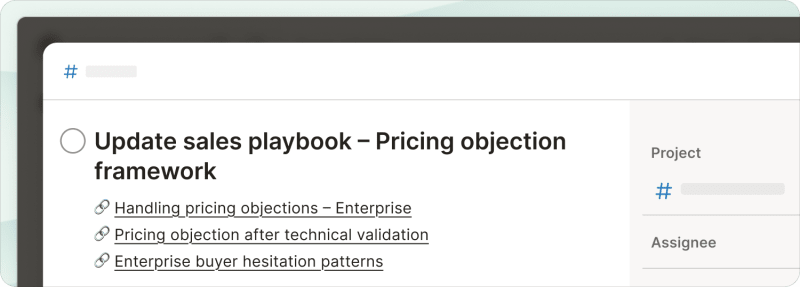
She adds a task in her project management system: “Update sales playbook – Pricing objection framework” with links to the relevant permanent notes.
Making it stick: tips and common pitfalls
A Zettelkasten only works if you keep using it. Like that gym membership you got in January, most knowledge management systems die quietly after a few weeks of initial enthusiasm. Here's how to avoid that.
Start simple, then build
Start with the material you’re engaging with right now.
Are you currently reading a book for work? Attending a webinar next week? Begin your Zettelkasten by capturing notes from those sources.
This fresh knowledge is easier to process because you instantly understand the context and get why it matters.
Once you’ve gotten the hang of it, go back and “retro-note” older material you’ve saved.
Focus on connecting ideas
Zettelkasten gets its power from linked notes.
When you write a permanent note, ask yourself: What does this idea connect to? Where does this idea contradict or support a note I already have? This linking process prompts you to think through the material.
A hundred interconnected notes beat a thousand isolated ones, so focus on quality over volume. Only add notes that will be valuable to link to later. If an idea doesn't connect to anything and won't in the future, it might not belong in your Zettelkasten.
Write your own notes
AI tools can help you save time by summarizing and extracting key points from long articles or transcripts. They can also find appropriate pages or timestamps for your citations.
But write permanent notes yourself. Notes written in your language will stick better than AI summaries that you’ve copied and pasted.
When you write a note in your own words, your brain makes connections, challenges assumptions, and integrates new information with what you already know.
That's the whole point of a Zettelkasten: building your understanding.
Zettelkasten helps you think more clearly, write smarter, and work faster by turning scattered information into connected knowledge.
The system sounds complex, but it starts simple: one idea, one note, one link.

Lisa Kalner Williams
Lisa Kalner Williams runs Sierra Tierra Marketing, a content and product marketing company trusted by B2B SaaS brands to build customer-obsessed content that drives conversions at all stages of the sales funnel.