The People Tab gives you a bird's-eye view of everyone's workload – all in one place, without digging through individual projects.
See who's assigned what, spot overdue tasks at a glance, and get the context you need to keep work moving as a team.
Observera
How to access
The People Tab lives right in your team workspace overview, next to the Projects tab.
- Click your team name in the left sidebar.
- At the top of the workspace, click the People Tab.
That's it – you'll see a list of everyone on your team along with their current tasks.
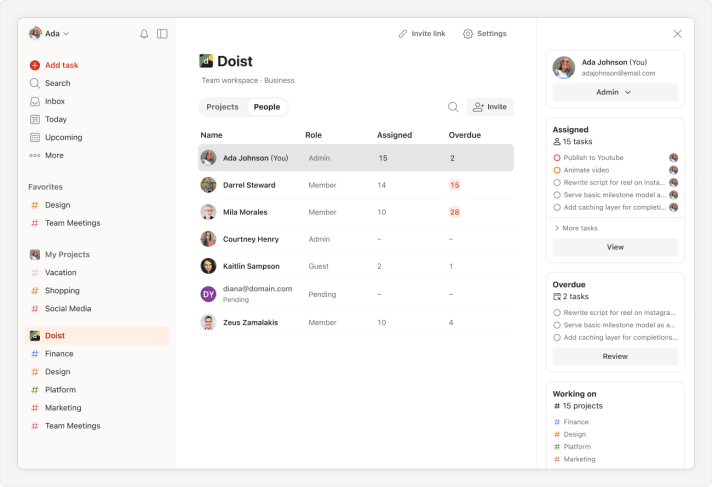
What’s included in the People Tab
- Name: The name and avatar of each person on your team.
- Role: Each person's role – Admin, Member, or Guest. Roles determine what each person can access in the team workspace. Learn more about team roles.
Snabbtips
- Assigned: The total number of tasks currently assigned to this person across all team projects. It's a quick way to gauge who's carrying a heavy load and who might have more capacity. Click the Assigned task value to open a detailed view of assigned tasks grouped by projects.
- Overdue: The number of tasks that are past their due date. Use this column to catch bottlenecks early and check in with teammates who may need support. Click the Overdue task value to open a detailed view of overdue tasks grouped by project.
Assigned and Overdue views
After you click into the Assigned or Overdue task volumes for a person from the People Tab, you’ll be taken to a detailed view. From here, you’ll see all current tasks assigned to that person organized by project (column headers). Tasks within each project are automatically sorted by priority, then date.
If you share a project with that person, you’ll be able to edit the tasks that you see in these detailed views. If you don’t, you won’t be able to edit the tasks, but you can comment on them to ask questions, provide feedback, or request more information.
Given the detailed and interactive nature of the Assigned and Overdue views, we recommend using this view as the backdrop for 1-on-1 conversations with your team.
Observera
How to sort and search in the People Tab
To find a specific person in the list, start typing their name or email address using the Search people icon in the top-right corner of the tab.
To sort the list by name, role, or the number of assigned or overdue tasks, click the respective column title. Click one more time to reverse the order.
People sidebar
To look at each person’s list of tasks or the projects they’re working on in more detail, simply click their name in the tab. A sidebar will appear on the right showing their assigned and overdue tasks, and the projects they’re actively working on (at least 1 task is currently assigned to them).
Get in touch
If you have any questions about using the People tab, contact us.