
Todoist est le premier gestionnaire de tâches au monde pour organiser votre travail et votre vie. En savoir plus
You know that feeling when you open your email inbox and the overwhelm hits immediately? When the unread number is so high you've stopped counting? When you know there are tons of important messages waiting for you, but sorting through them would take hours if not days?
You're certainly not alone. Email has become a constant source of low-grade anxiety for many of us. It creates a steady drip of interruptions that drain your attention and compromise your focus.
The inbox zero method can help you achieve a clean slate. But despite what the name implies, it doesn’t have to be about obsessively maintaining an empty inbox. Instead, inbox zero helps you reclaim your attention so you can focus on work that really matters.
What is inbox zero?
Inbox zero is a concept that writer Merlin Mann introduced on his blog in 2006. In short, it's a productivity method for quickly processing email.
While this method helps keep your inbox empty, the goal of inbox zero isn't necessarily perfection. Instead, it's about gaining better control over your time and preventing your inbox from taking up unnecessary mental space.
As :
"Just remember that every email you read, re-read, and re-re-re-re-re-read as it sits in that big dumb pile is actually incurring mental debt on your behalf. The interest you pay on email you're reluctant to deal with is compounded every day."
Every unprocessed message leaves an open loop in your brain, prompting you to ask yourself:
Is this important?
Should I have replied already?
What was I supposed to do about this anyway?
Think of inbox zero as a system for closing those loops. With this method, you process each message decisively and then move on. This way, you manage your inbox efficiently and then stop thinking about your email when you're not actively dealing with it.
Why Inbox Zero Helps Improve Focus and Reduce Stress
An overflowing inbox creates a specific kind of stress: a constant, low-grade worry.
Much of this stress comes from ambiguity. You know some things in your inbox need attention, but you're not sure which emails or how urgent they are. And you're not sure when you'll have time or energy to deal with them.
The scale of the problem is real. On average, employees receive 117 emails per day! That's 117 small decisions, 117 potential interruptions, and 117 things competing for a slice of your attention.
Each interruption demands context switching, which carries a hidden cost. It takes people about 23 minutes to fully return to a task after being interrupted, according to research from the University of California, Irvine. So, that "quick" email check harms your focus far more than you might realize.
By adopting an inbox zero approach, you:
Decrease mental load: Processing your inbox transforms an undefined to-do list into concrete actions. In many cases, you can just delete messages since most don't actually require anything from you.
Prioritize more clearly: When your inbox is under control, you can distinguish between what's genuinely urgent and what's just new and flashy. This way, the newest, loudest emails stop running your day.
Drop fewer balls: When you process your inbox regularly, important messages don't get buried under noise. This means important tasks stop slipping through the cracks.
How does the inbox zero method work?
The inbox zero method follows a straightforward workflow. Instead of "checking" your email (scanning through messages without really deciding anything), you process it. For every email, apply one of these four actions:
Delete or archive anything that doesn't require action: junk, irrelevant, or outdated messages. Get them out of your inbox immediately. Delete to remove them altogether or archive emails so they're still searchable but no longer taking up mental space.
Delegate tasks by forwarding emails to whoever should actually handle them. If an email landed in your inbox by mistake or if someone else is responsible, pass it along. Don't let other people's work pile up in your space.
Do any important email-related tasks that you can complete in under two minutes. This helps clear small tasks quickly.
Defer messages that require more intensive work. But don't leave them in your inbox as a reminder. The key to keeping your inbox empty is not treating it like a to-do list. Instead, move them into a task management system with a due date and context.
Remember: Make a quick decision about every message and act on it right away. Don't reread emails more than once while you avoid committing. Decide what to do, handle it accordingly, and get it out of your inbox.
How to Make Inbox Zero Work for You
The method is simple in theory, but implementing it requires some practice. Here's how to make it sustainable.
Steps to Get Started with Inbox Zero
Start fresh. If your email is really out of control, you can reach inbox zero fast by removing outdated messages. archiving emails older than 21 days. This stops you from feeling behind and having to catch up.
Eliminate clutter. Reduce the amount of email you need to process so you can organize your inbox quickly. Unsubscribe from newsletters you never read. Set up strict spam filters to keep junk mail out of your inbox.
Create a few folders or labels. Skip the elaborate filing system. Keep it minimal and meaningful: folders for certain actions you often repeat and labels for specific projects or areas of your life. Set them to apply automatically based on the sender or the subject.
For example, I use Gmail labels for each of my active freelance clients or projects. I set up Gmail filters to automatically label emails from my points of contact for each project. Since each label is color coded, a glance at my inbox instantly tells me which project needs attention.
Set scheduled times to process email. This is non-negotiable if you want to focus. Schedule one or more blocks during the day to process your inbox. For example, 9 a.m., 1 p.m., and 4 p.m. Batch your email time to reduce context switching.
Writer and editor Carol J. Alexander shares:
"Each morning, I either skip or delete emails based on their subject line. If I sense they require action on my part, I don't open them until I'm ready to take action (e.g., a client assignment that needs plugged into my project management system)."
Turn off push notifications. Email notifications are designed to interrupt you. Switch them off across devices to improve your focus. Then, stick to the schedule you set.
Tips to Stay on Track with Inbox Zero
Do weekly inbox reviews. Once a week, review the productivity system you've created:
Are the filters, folders, and labels still simplifying your process? Or are they creating a time management nightmare?
Are you successfully forwarding important messages to your task manager and getting things done? Or are tasks stagnating?
These quick check-ins keep your system running smoothly and help you avoid missing anything critical.
Use automation to simplify. Email filters can automate a lot of time-consuming work for you. Create them for receipts, notifications, and other messages you'd archive anyway. This way, they bypass your inbox entirely, yet you still have a record if necessary.
Decide when to bend the rules. Some days are chaotic: Meetings run long, emergencies happen, and your inbox doesn't hit zero. That's okay. The system is designed to reduce stress, not create a new source of it. Inbox 20 might be a more realistic goal either on those days or on a permanent basis.
"To me, inbox zero just seems like a goal that makes me feel like I'm being productive. But it's actually more of a distraction than anything," explains freelance writer and content strategist Rachel Bicha.
"I try to keep it below inbox 50. Otherwise, I deal with what's urgent, sort what's not (newsletters or things I'm going to read later), and leave stuff I need to get to but not right this second unread in my inbox so I don't lose or forget about them. It works for me."
Common Pitfalls with Inbox Zero
Perfectionism is the biggest trap. People often hear "inbox zero" and think it means maintaining exactly zero messages at all times.
If that’s your goal, wonderful! But remember, the point is to reduce stress, not create an impossible task. Process your inbox at your scheduled times, and then let it go.
Over-categorization can make your entire system break down. If you create 30 folders and 50 labels, you'll waste time filing each message and abandon the whole thing within a week. Keep it as simple as possible.
Deferring everything might solve your cluttered inbox. But it also creates more work for future you. Be honest about what actually needs to happen, and schedule time to work through important tasks. Or delete them if they don't really matter.
6 Ways to Reach Inbox Zero with Todoist
Todoist gives you a place to manage the work that's hiding in your emails. Here's how to stay on top of your inbox and manage your to-do list with Todoist.
1. Use Quick Add to Capture Deferred Tasks
When you're in the flow of processing email, use Todoist's Quick Add feature to capture tasks instantly. Press the keyboard shortcut Q or click + Add task to open the Quick Add window. Input the task details (including a due date) and add it to your list.
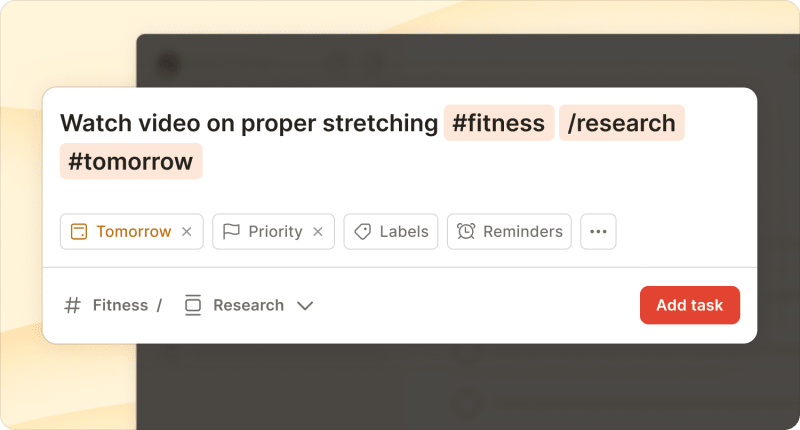
There's no need to break your flow. Go right back to processing your email and deal with the task at the appointed time.
2. Integrate Todoist with Gmail and Outlook
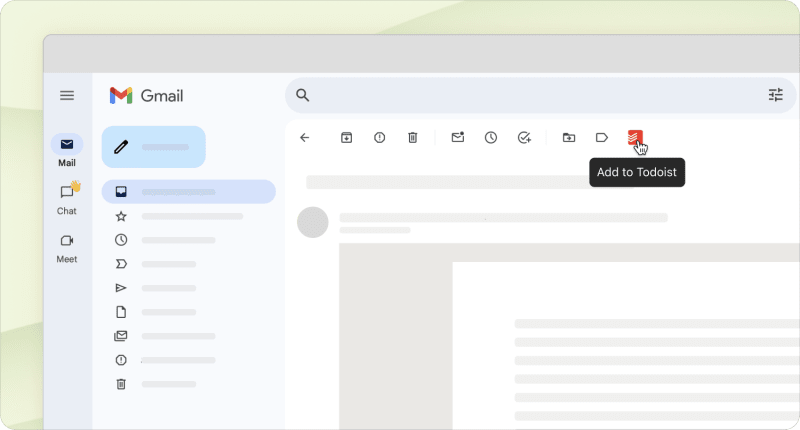
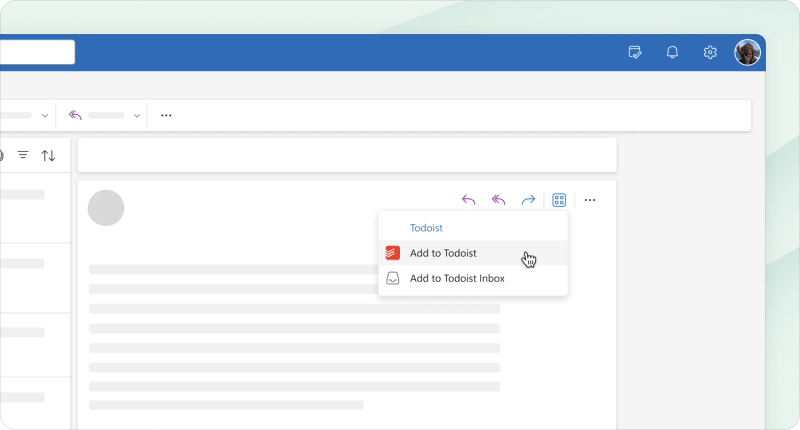
Todoist gives you three ways to turn emails into tasks without the need for Quick Add.
After installing Todoist's Gmail integration, open any email and click the Add to Todoist button in the toolbar.
With the Outlook integration, you'll find the Add to Todoist button in the Apps dropdown.
If you have a Todoist Pro or Business subscription, you can use Email Assist to turn forwarded emails into tasks. Optionally, modify the subject line to include the date, priority level, and other details you want to appear in the task.
3. Create Filters and Labels to Simplify Follow-Ups
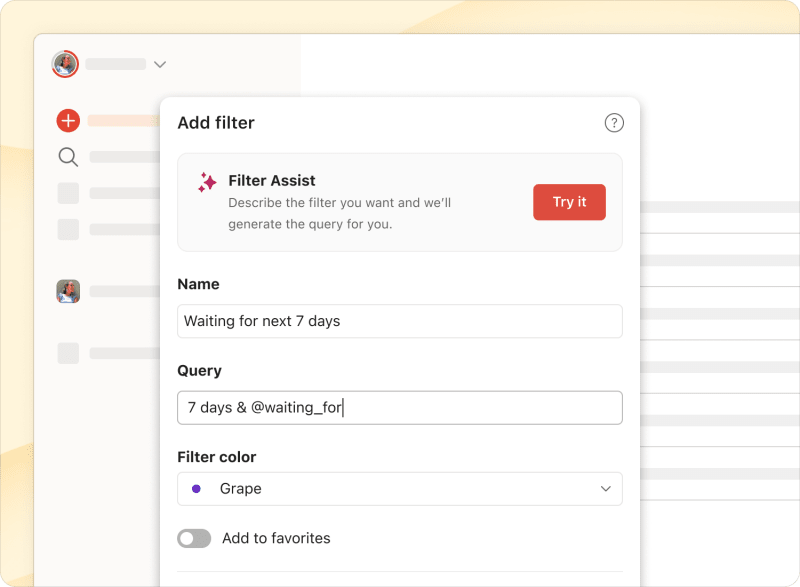
Set up a Todoist label like @waiting_for to track times when you're waiting on someone else. Then, when you send an email that requires a response, create a Todoist task with that label and a reminder for a few days out. This prevents things from falling through the cracks when people don't reply.

Then, create filters to quickly find tasks that require follow-up. For example, the filter @waiting_for & 7 days will pull up tasks that are waiting on someone else and that are due in the next week.
4. Use Todoist to Time Block Email Processing
Block time on your calendar for processing emails. Switch to Todoist's calendar layout and create specific time slots. Then, set up a recurring task using natural language. Like Process Email every weekday at 9am for 30m.
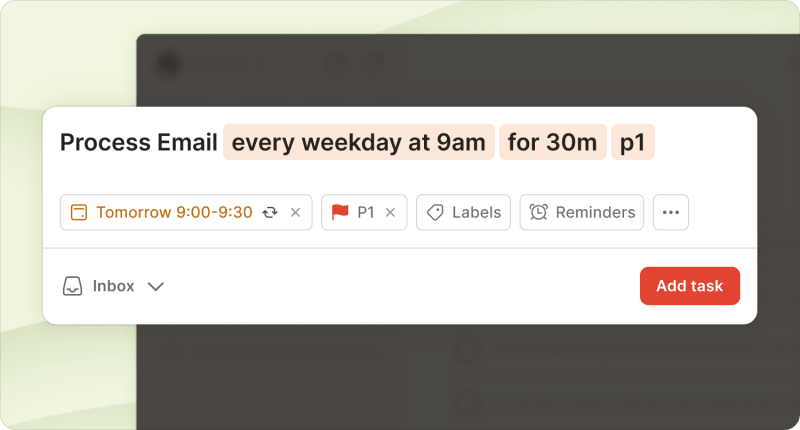
Time blocking ensures inbox zero is always on your task list at the right time each day. It helps you protect focus time and prevent email from taking over your day.
5. Set up Recurring Tasks for Inbox Reviews
Create a recurring weekly task to review your Todoist inbox and prevent deferred tasks from piling up. Go through your inbox, assign projects, and set due dates.
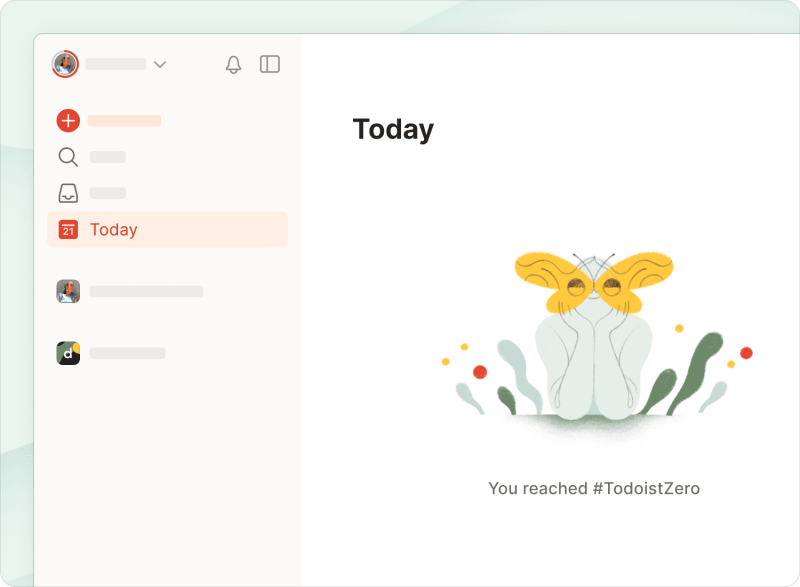
6. Aim to Achieve Todoist Zero Each Day
Todoist is the ideal place to add and manage deferred tasks. But like your email inbox, your Todoist dashboard can easily get cluttered.
Make a point to process your task lists regularly and make real progress. Set realistic due dates, delegate tasks that belong to someone else on your team, and check off tasks as you complete them. Then, look forward to reaching Todoist zero.
Is inbox zero realistic?
Over the years, inbox zero has attracted a bit of a cult following. Some adherents treat an empty inbox like a badge of honor or feel genuine stress if a message sits for an hour.
That's neither healthy nor helpful. As Mann explains, the more inboxes you accumulate across email, social media, and messaging apps, the easier it is to feel a sense of overload. Above all, it's essential to focus on what matters to you.
So, whether this email management system is realistic depends entirely on your situation and what you need to prioritize.
The method works best when:
Most of your emails are clear action items with obvious next steps
You have autonomy over your schedule and can batch your email processing
You work in an environment where immediate responses aren't expected for everything
Your role treats email as a supporting tool, not the primary work itself
"I'm selectively inbox zero," shares Katarina Andrejević, content strategist at Opascope. She hasn't purged her personal email in years. "But my work inboxes, especially in the roles more oriented toward community and partnerships, are inbox zero. If I have to keep track of conversations there, I have to keep them tidy."
The method might not be right when:
Your job is primarily email-based (customer support, executive assistance)
You receive so many messages that processing them all would be a full-time job
Your role genuinely requires near-instant responses to most messages
You simply have other more important tasks to tackle
"The idea sounds great in theory. But in reality, I know I’m not the kind of person that this will work for," explains Becky Lawlor, founder of .
"I'm just not one to spend the time organizing when I've got 900 things on my plate to get done. Ultimately, I like the idea of a clean inbox, but Gmail's search feature works really well. So I don't think I'll ever decide that spending the time organizing my emails is worth it with other tasks that are much higher priority and will deliver much greater ROI."
As Mann puts it:
"For me, the real 'zero' in inbox zero is more about consciously managing the amount of our attention that we commit (or, far more often, cede) to thinking and worrying about what may or may not be piling up while we're away doing the real work of our lives."
If inbox zero sounds realistic for you, there's an easy way to start. Begin by scheduling one focused block of time to process your inbox.
You might be surprised how much lighter your day becomes when your inbox stops taking up mental space.

Anna Sonnenberg
Anna Sonnenberg is a writer, editor, and strategist with over a decade of experience creating content for B2B SaaS companies like Agorapulse, Komodo, and Relato. As a seasoned freelancer managing a dynamic client roster, she's always testing productivity and time management tactics.